Asset Configuration Migration
Information in this section is relevant for configurations with the old calculation algorithm.
In case of successful data migration, it is impossible to return to the previous version!
When opening an asset configuration card, a notification about available calculation algorithm update will be displayed at the top of the window:

To start the update process, you need to click on the notification, and then in the opened window — on the Start Migration button:
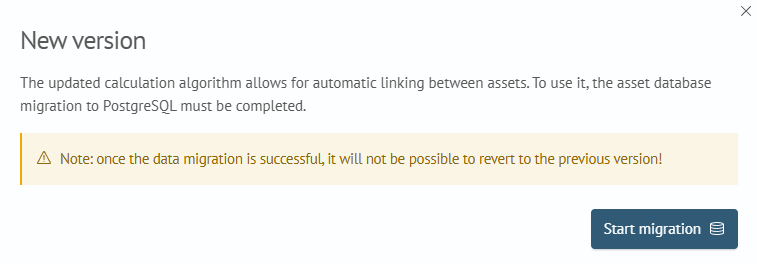
After starting the migration, the notification will change to indicate that the asset configuration is in the migration process:

The migration process occurs in the background (you can exit the configuration card and return at any time).
The asset database is transferred in batches of 10000 records.
During migration, some functions related to this configuration may be temporarily unavailable.
During migration, information about its execution is updated in real time. To view details, you need to click on the notification. Also, if necessary, you can cancel the migration process by clicking the corresponding button:

After completing the migration, a notification about successful process completion will appear:

To view detailed information, you can click on the notification and see the migration results:

To stop displaying the successful migration notification, you need to click the Close button.
If an error occurred during migration, the notification will change to the corresponding one:

To view error information, click on the notification. After studying the error, you can restart the migration by clicking the Restart Migration button:

In case of an error or manual cancellation of the migration process, all already transferred data will be deleted!