Configuring the Search Anywhere Framework Audit Log
The audit log records security events in Search Anywhere Framework: authentication attempts, REST API and transport-layer requests, privilege checks, and reads or changes to data selected for compliance monitoring.
Search Anywhere Framework uses the OpenSearch Security audit mechanism. Events are generated on Search Anywhere Framework nodes and sent to the storage configured in opensearch.yml. The Search Anywhere Framework interface lets you enable auditing and change its dynamic parameters.
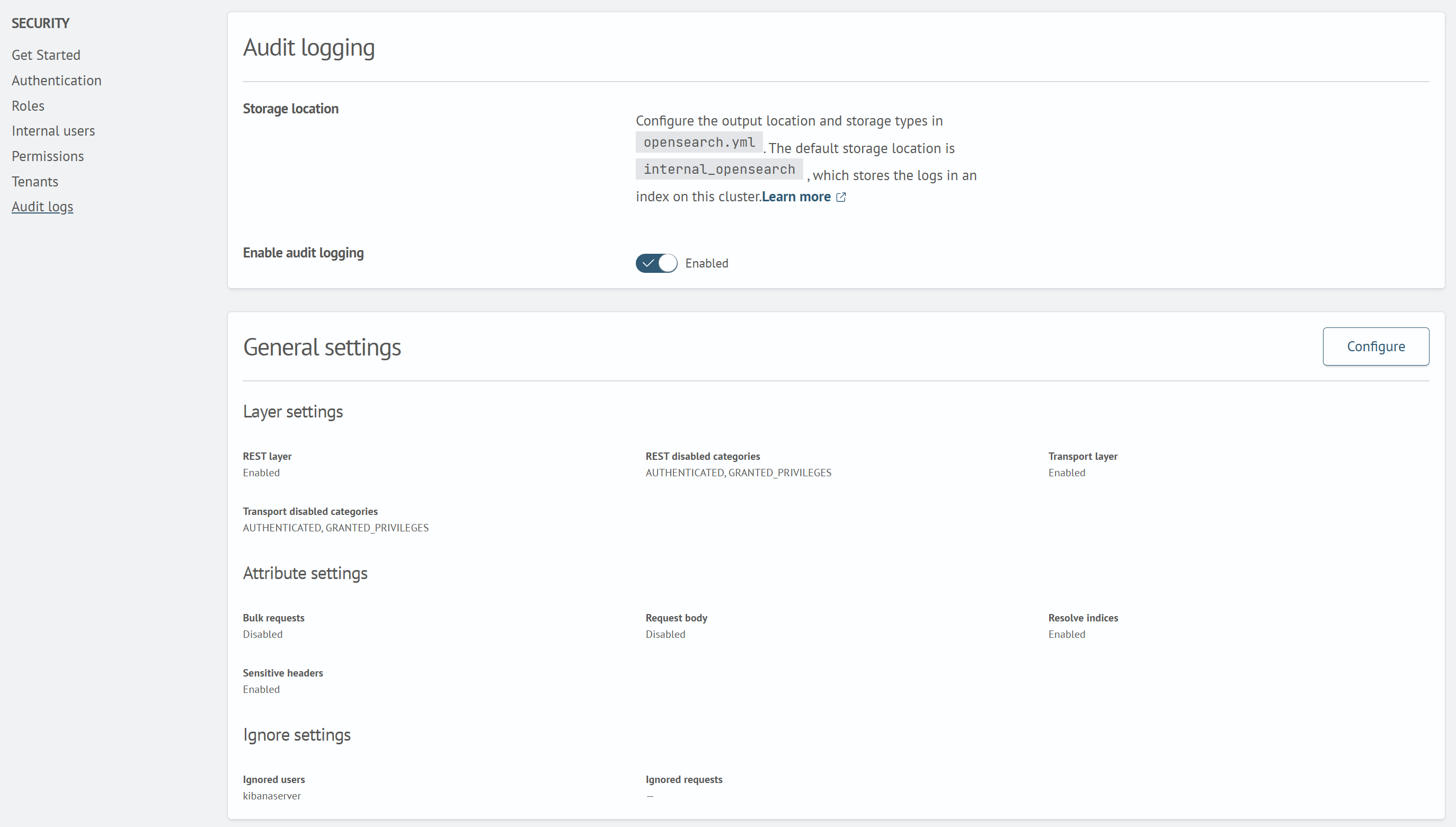
Enable only the required categories and attributes. Detailed auditing, especially logging successful requests, document contents, and _bulk operations, increases cluster load and storage usage.
Preparing the Storage
Before configuring the audit log through the UI, set the audit storage type in opensearch.yml on every Search Anywhere Framework node. Use internal_opensearch to store events in the current cluster:
plugins.security.audit.type: internal_opensearch
After the initial opensearch.yml change, restart the nodes using the standard procedure for your Search Anywhere Framework installation.
systemctl restart opensearch
You can change the remaining parameters through the UI.
With internal_opensearch, events are written to an index in the current cluster. If the index name is not overridden, Search Anywhere Framework creates daily indices in the internal_audit-YYYY.MM format. You can configure the name and rotation period separately:
plugins.security.audit.config.index: "'internal_audit-'YYYY.MM"
Opening the Settings
To open the Audit Log settings in the interface:
- Open
Main Menu - Go to
Settings-Security Settings - In the
Securitysection, selectAudit Log - In the
Audit Loggingblock, enableEnable Audit Loggingif it is disabled - Configure the
General SettingsandCompliance Parametersblocks using theEditbuttons - Select
Save. TheCancelbutton closes the form without saving changes
Alternatively:
- Open
Main Menu - Go to
Settings-Dev Tools - Run
GET _plugins/_security/api/audit - Change the settings with
PUTorPATCHrequests. For example:
PUT /_plugins/_security/api/audit/config
{
    "enabled": true,
    "audit": {
        "ignore_users": [],
        "ignore_requests": [],
        "disabled_rest_categories": [
            "AUTHENTICATED",
            "GRANTED_PRIVILEGES"
        ],
        "disabled_transport_categories": [
            "AUTHENTICATED",
            "GRANTED_PRIVILEGES"
        ],
        "log_request_body": false,
        "resolve_indices": false,
        "resolve_bulk_requests": false,
        "exclude_sensitive_headers": true,
        "enable_transport": false,
        "enable_rest": true
    },
    "compliance": {
        "enabled": true,
        "write_log_diffs": false,
        "read_watched_fields": {},
        "read_ignore_users": [],
        "write_watched_indices": [],
        "write_ignore_users": [],
        "read_metadata_only": true,
        "write_metadata_only": true,
        "external_config": false,
        "internal_config": true
    }
}
The user must have permissions to manage Search Anywhere Framework security settings.
General Settings
This section describes the General Settings parameters of the audit log.
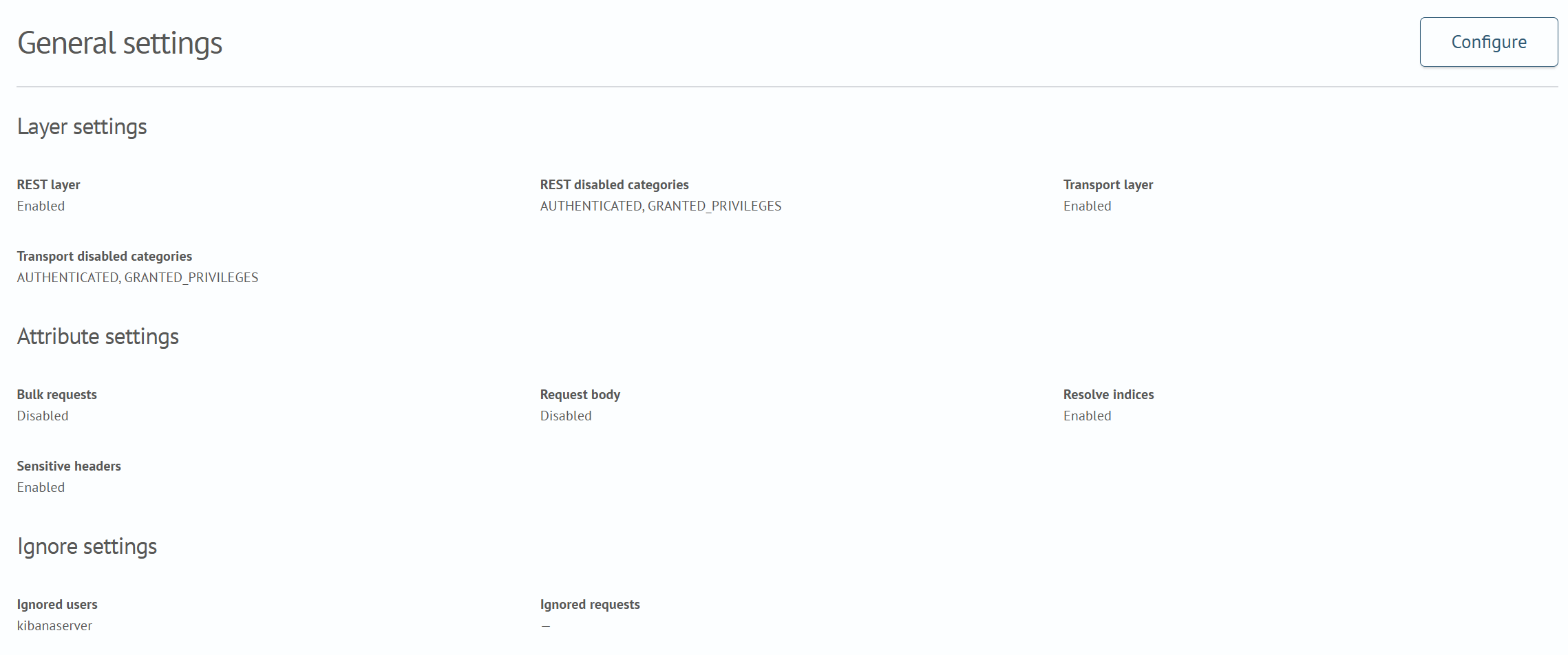
Layer Settings
| UI parameter | Key | Purpose |
|---|---|---|
REST Layer | audit:enable_rest | Logs external HTTP requests to the REST API |
Disabled REST Categories | audit:disabled_rest_categories | Excludes selected REST event categories |
Transport Layer | audit:enable_transport | Logs internal transport requests between Search Anywhere Framework components and nodes |
Disabled Transport Categories | audit:disabled_transport_categories | Excludes selected transport event categories |
Main audit categories include FAILED_LOGIN, AUTHENTICATED, MISSING_PRIVILEGES, GRANTED_PRIVILEGES, SSL_EXCEPTION, OPENDISTRO_SECURITY_INDEX_ATTEMPT, BAD_HEADERS, CLUSTER_SETTINGS_CHANGED, and INDEX_SETTINGS_CHANGED.
Attribute Settings
| UI parameter | Key | Purpose and recommendations |
|---|---|---|
Bulk Requests | audit:resolve_bulk_requests | Splits a _bulk request into separate document-operation events |
Request Body | audit:log_request_body | Adds the request body to the event; it may contain sensitive data |
Resolve Indices | audit:resolve_indices | Adds original and resolved index names, including aliases and patterns |
Sensitive Headers | audit:exclude_sensitive_headers | Excludes confidential headers such as Authorization; keep enabled |
Ignore Settings
| UI parameter | Key | Purpose |
|---|---|---|
Ignored Users | audit:ignore_users | Does not create events for the specified users |
Ignored Requests | audit:ignore_requests | Does not create events for matching transport actions or REST API paths; patterns are supported |
Do not exclude administrator accounts without separate justification. After changing exclusions, verify that the operations under investigation continue to be logged.
Compliance Parameters
Compliance mode supplements regular auditing with security-configuration change events and read or write monitoring for selected data.
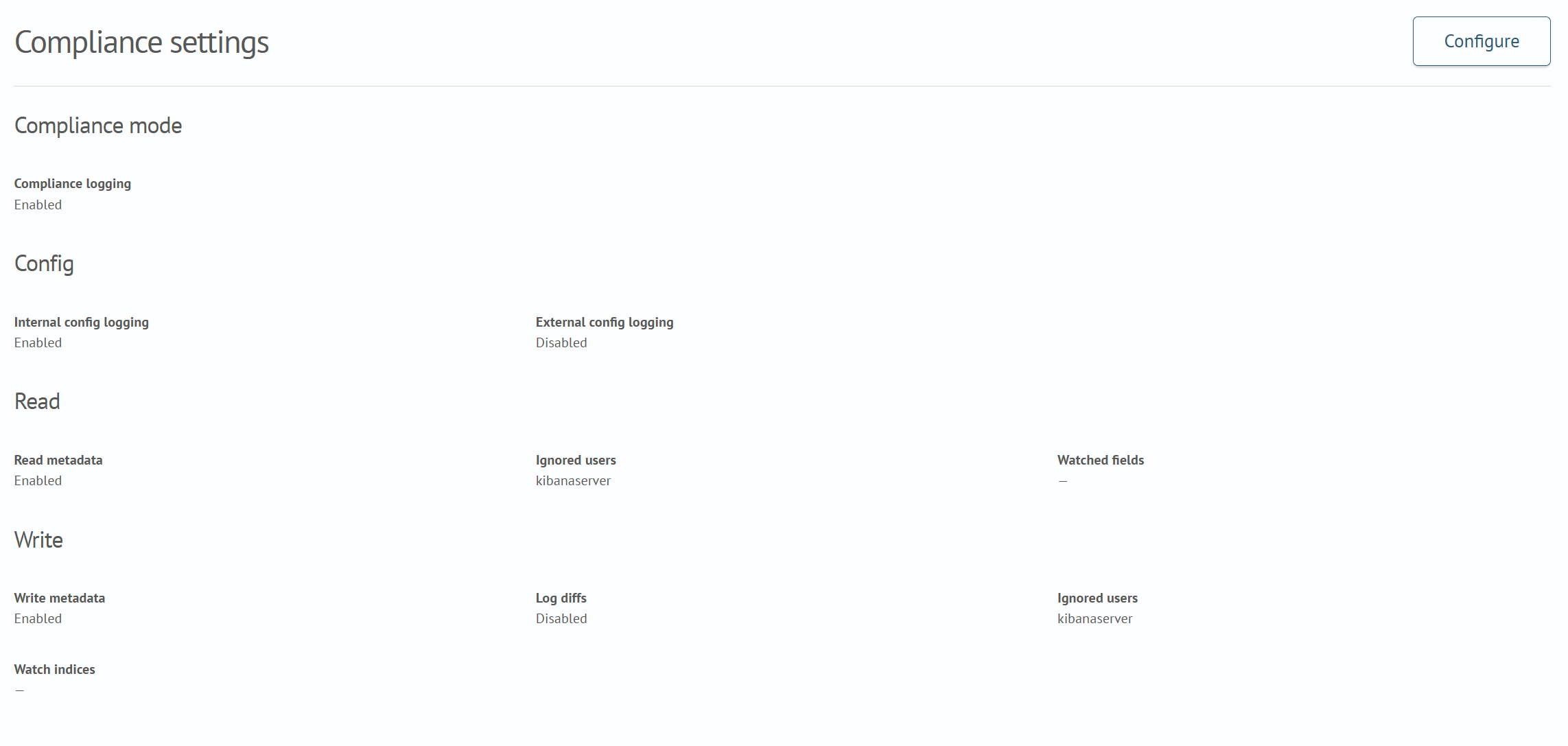
Mode and Configuration
| UI parameter | Key | Purpose |
|---|---|---|
Enable Compliance Logging | compliance:enabled | Enables compliance parameter processing |
Log Internal Configuration | compliance:internal_config | Logs changes to internal Security configuration |
Log External Configuration | compliance:external_config | Logs changes to external security configuration |
Read Monitoring
| UI parameter | Key | Purpose |
|---|---|---|
Read Metadata Only | compliance:read_metadata_only | Logs access metadata without document contents |
Ignored Users | compliance:read_ignore_users | Excludes specified users from read auditing |
Watched Fields | compliance:read_watched_fields | Limits read monitoring to specified indices and fields |
The Watched Fields field accepts a JSON object where the key is an index or index pattern and the value is a list of fields or field patterns:
{
  "logs*": ["message"],
  "users": ["id", "email", "profile.*"]
}
Write Monitoring
| UI parameter | Key | Purpose |
|---|---|---|
Write Metadata Only | compliance:write_metadata_only | Logs only write-operation metadata without document contents |
Write Log Diffs | compliance:write_log_diffs | Stores document changes instead of the full state |
Ignored Users | compliance:write_ignore_users | Excludes specified users from write auditing |
Watched Indices | compliance:write_watched_indices | Limits write auditing to specified indices or patterns |
Recommended Profiles
| Task | Recommended parameters |
|---|---|
| Login and access-error monitoring | Keep FAILED_LOGIN, AUTHENTICATED, MISSING_PRIVILEGES, SSL_EXCEPTION, and BAD_HEADERS; disable request-body logging |
| Access-denial investigation | Enable REST and transport layers and index resolution; do not exclude MISSING_PRIVILEGES |
| Administrative-change monitoring | Enable Enable Compliance Logging and Log Internal Configuration; do not exclude administrators |
| Critical-data access monitoring | Configure Watched Fields and Watched Indices; keep metadata-only modes enabled |
| Full successful-operation tracing | Do not exclude GRANTED_PRIVILEGES; assess performance, retention, and audit-index volume in advance |
Verifying the Configuration
After saving the settings:
- Perform a safe test action that matches an enabled category, such as a successful request or an intentionally rejected request from a test user
- Make sure that a new record appears in the selected storage
- Check
audit_category,audit_request_layer, the user, the path or transport action, and affected indices - Make sure that the request body and sensitive headers are absent when their logging is disabled
- Make sure that user and request exclusions do not hide required events
For internal_opensearch, analyze records with Search Anywhere Framework search and visualization tools using the audit index. Event fields are described in Audit Log Field Descriptions.
Verification examples:
- Run the following request
GET _cat/shards
The equivalent request in the console:
curl -XGET -ku <User> "https://localhost:9200/_cat/shards"
- Go to
Main Menu-Basic-Searchand run the following query
source internal_audit-*
| search audit_rest_request_path.keyword = "/_cat/shards"
- Find the event for this request
{
    "_index": "internal_audit-2026.08",
    "_type": "internal:internal_audit-*:",
    "_id": "1veJR6ABznHokKDdW0t_",
    "_score": 0,
    "_source": {
        "audit_cluster_name": "saf-cluster",
        "audit_rest_request_params": {
            "pretty": "true"
        },
        "audit_node_name": "saf-node-00",
        "audit_request_initiating_user": "admin",
        "audit_rest_request_method": "GET",
        "audit_category": "AUTHENTICATED",
        "audit_request_origin": "REST",
        "audit_node_id": "USQ4yKPDRY-sNSb2B6QXTA",
        "audit_request_layer": "REST",
        "audit_rest_request_path": "/_cat/shards",
        "@timestamp": "2026-08-28T08:42:59.326+00:00",
        "audit_request_effective_user_is_admin": false,
        "audit_format_version": 4,
        "audit_request_remote_address": "127.0.0.1",
        "audit_node_host_address": "172.17.0.2",
        "audit_rest_request_headers": {
            "content-length": [
                "0"
            ],
            "x-forwarded-host": [
                "localhost:5601"
            ],
            "x-forwarded-proto": [
                "https"
            ],
            "x-opensearch-product-origin": [
                "opensearch-dashboards"
            ],
            "Connection": [
                "keep-alive"
            ],
            "x-forwarded-port": [
                "39620"
            ],
            "x-opaque-id": [
                "7289f351-9229-47b6-a3aa-40d2cb020eb2"
            ],
            "content-type": [
                "application/json"
            ],
            "Host": [
                "localhost:9200"
            ],
            "x-forwarded-for": [
                "172.17.0.1"
            ],
            "user-agent": [
                "opensearch-js/2.13.0 (linux 5.15.167.4-microsoft-standard-WSL2-x64; Node.js v22.22.1)"
            ]
        },
        "audit_request_effective_user": "admin",
        "audit_node_host_name": "172.17.0.2"
    }
}
Alternatively, verify a Search Anywhere Framework job request:
GET _core/job_scheduler/jobs
The equivalent request in the console:
curl -XGET -ku <User> "https://localhost:9200/_core/job_scheduler/jobs"
Run the following query in Main Menu - Basic - Search:
source internal_audit-*
| search audit_rest_request_path.keyword = "/_core/job_scheduler/jobs"
{
    "_index": "internal_audit-2026.08",
    "_type": "internal:internal_audit-*:",
    "_id": "cPeOR6ABznHokKDdFExS",
    "_score": 0,
    "_source": {
        "audit_cluster_name": "saf-cluster",
        "audit_rest_request_params": {
            "pretty": "true"
        },
        "audit_node_name": "saf-node-00",
        "audit_request_initiating_user": "admin",
        "audit_rest_request_method": "GET",
        "audit_category": "AUTHENTICATED",
        "audit_request_origin": "REST",
        "audit_node_id": "USQ4yKPDRY-sNSb2B6QXTA",
        "audit_request_layer": "REST",
        "audit_rest_request_path": "/_core/job_scheduler/jobs",
        "@timestamp": "2026-08-28T08:48:08.785+00:00",
        "audit_request_effective_user_is_admin": false,
        "audit_format_version": 4,
        "audit_request_remote_address": "127.0.0.1",
        "audit_node_host_address": "172.17.0.2",
        "audit_rest_request_headers": {
            "content-length": [
                "0"
            ],
            "x-forwarded-host": [
                "localhost:5601"
            ],
            "x-forwarded-proto": [
                "https"
            ],
            "x-opensearch-product-origin": [
                "opensearch-dashboards"
            ],
            "Connection": [
                "keep-alive"
            ],
            "x-forwarded-port": [
                "54324"
            ],
            "x-opaque-id": [
                "7ce0a945-ab53-481f-ac80-c4431132d55a"
            ],
            "content-type": [
                "application/json"
            ],
            "Host": [
                "localhost:9200"
            ],
            "x-forwarded-for": [
                "172.17.0.1"
            ],
            "user-agent": [
                "opensearch-js/2.13.0 (linux 5.15.167.4-microsoft-standard-WSL2-x64; Node.js v22.22.1)"
            ]
        },
        "audit_request_effective_user": "admin",
        "audit_node_host_name": "172.17.0.2"
    }
}
Audit Log Field Descriptions
General Fields
The following attributes are recorded for all event categories, regardless of the layer.
| Field name | Description |
|---|---|
audit_format_version | Audit log message format. |
audit_category | Audit log category. Possible values: FAILED_LOGIN, MISSING_PRIVILEGES, BAD_HEADERS, SSL_EXCEPTION, OPENDISTRO_SECURITY_INDEX_ATTEMPT, AUTHENTICATED, GRANTED_PRIVILEGES, CLUSTER_SETTINGS_CHANGED, and INDEX_SETTINGS_CHANGED. |
audit_node_id | ID of the node that generated the event. |
audit_node_name | Name of the node that generated the event. |
audit_node_host_address | Host address of the node. |
audit_node_host_name | Host name of the node. |
audit_request_layer | Layer that generated the event: TRANSPORT or REST. |
audit_request_origin | Layer from which the event originated: TRANSPORT or REST. |
audit_request_effective_user_is_admin | true if the request was sent with an administrative TLS certificate; otherwise, false. |
REST FAILED_LOGIN Fields
The following attributes are recorded for failed REST login events.
| Field name | Description |
|---|---|
audit_request_effective_user | User for whom authentication failed. |
audit_request_initiating_user | User that sent the request. Recorded only when different from the current user. |
audit_rest_request_path | REST endpoint URI. |
audit_rest_request_params | HTTP request parameters, if present. |
audit_rest_request_headers | HTTP headers, if present. |
audit_request_body | HTTP request body, if present and request-body logging is enabled. |
audit_rest_request_method | HTTP request method. |
REST SSL_EXCEPTION Fields
The following attributes are recorded for REST SSL exception events.
| Field name | Description |
|---|---|
audit_request_exception_stacktrace | SSL exception stack trace. |
REST BAD_HEADERS Fields
The following attributes are recorded for REST events with invalid headers.
| Field name | Description |
|---|---|
audit_rest_request_path | REST endpoint URI. |
audit_rest_request_params | HTTP request parameters, if present. |
audit_rest_request_headers | HTTP headers, if present. |
audit_request_body | HTTP request body, if present and request-body logging is enabled. |
Transport FAILED_LOGIN Fields
The following attributes are recorded for transport failed-login events.
| Field name | Description |
|---|---|
audit_trace_task_id | Request ID. |
audit_transport_headers | Request headers, if present. |
audit_request_effective_user | User for whom authentication failed. |
audit_request_initiating_user | User that sent the request. Recorded only when different from the current user. |
audit_transport_request_type | Request type, for example, IndexRequest. |
audit_request_body | HTTP request body, if present and request-body logging is enabled. |
audit_trace_indices | Index names included in the request. May contain wildcards, date patterns, and aliases. Recorded only when resolve_indices is true. |
audit_trace_resolved_indices | Resolved index names affected by the request. Recorded only when resolve_indices is true. |
audit_trace_doc_types | Document types affected by the request. Recorded only when resolve_indices is true. |
Transport AUTHENTICATED Fields
The following attributes are recorded for transport successful-authentication events.
| Field name | Description |
|---|---|
audit_trace_task_id | Request ID. |
audit_transport_headers | Request headers, if present. |
audit_request_effective_user | User for whom authentication succeeded. |
audit_request_initiating_user | User that sent the request. Recorded only when different from the current user. |
audit_transport_request_type | Request type, for example, IndexRequest. |
audit_request_body | HTTP request body, if present and request-body logging is enabled. |
audit_trace_indices | Index names included in the request. May contain wildcards, date patterns, and aliases. Recorded only when resolve_indices is true. |
audit_trace_resolved_indices | Resolved index names affected by the request. Recorded only when resolve_indices is true. |
audit_trace_doc_types | Document types affected by the request. Recorded only when resolve_indices is true. |
Transport MISSING_PRIVILEGES Fields
The following attributes are recorded for transport events with missing privileges.
| Field name | Description |
|---|---|
audit_trace_task_id | Request ID. |
audit_trace_task_parent_id | Parent request ID, if present. |
audit_transport_headers | Request headers, if present. |
audit_request_effective_user | User for whom authentication failed. |
audit_request_initiating_user | User that sent the request. Recorded only when different from the current user. |
audit_transport_request_type | Request type, for example, IndexRequest. |
audit_request_privilege | Required request privilege, for example, indices:data/read/search. |
audit_request_body | HTTP request body, if present and request-body logging is enabled. |
audit_trace_indices | Index names included in the request. May contain wildcards, date patterns, and aliases. Recorded only when resolve_indices is true. |
audit_trace_resolved_indices | Resolved index names affected by the request. Recorded only when resolve_indices is true. |
audit_trace_doc_types | Document types affected by the request. Recorded only when resolve_indices is true. |
Transport GRANTED_PRIVILEGES Fields
The following attributes are recorded for transport events with granted privileges.
| Field name | Description |
|---|---|
audit_trace_task_id | Request ID. |
audit_trace_task_parent_id | Parent request ID, if present. |
audit_transport_headers | Request headers, if present. |
audit_request_effective_user | User for whom authentication succeeded. |
audit_request_initiating_user | User that sent the request. Recorded only when different from the current user. |
audit_transport_request_type | Request type, for example, IndexRequest. |
audit_request_privilege | Required request privilege, for example, indices:data/read/search. |
audit_request_body | HTTP request body, if present and request-body logging is enabled. |
audit_trace_indices | Index names included in the request. May contain wildcards, date patterns, and aliases. Recorded only when resolve_indices is true. |
audit_trace_resolved_indices | Resolved index names affected by the request. Recorded only when resolve_indices is true. |
audit_trace_doc_types | Document types affected by the request. Recorded only when resolve_indices is true. |
Transport SSL_EXCEPTION Fields
The following attributes are recorded for transport SSL exception events.
| Field name | Description |
|---|---|
audit_request_exception_stacktrace | SSL exception stack trace. |
Transport BAD_HEADERS Fields
The following attributes are recorded for transport events with invalid headers.
| Field name | Description |
|---|---|
audit_trace_task_id | Request ID. |
audit_trace_task_parent_id | Parent request ID, if present. |
audit_transport_headers | Request headers, if present. |
audit_request_effective_user | User for whom authentication failed. |
audit_request_initiating_user | User that sent the request. Recorded only when different from the current user. |
audit_transport_request_type | Request type, for example, IndexRequest. |
audit_request_body | HTTP request body, if present and request-body logging is enabled. |
audit_trace_indices | Index names included in the request. May contain wildcards, date patterns, and aliases. Recorded only when resolve_indices is true. |
audit_trace_resolved_indices | Resolved index names affected by the request. Recorded only when resolve_indices is true. |
audit_trace_doc_types | Document types affected by the request. Recorded only when resolve_indices is true. |
Transport OPENDISTRO_SECURITY_INDEX_ATTEMPT Fields
The following attributes are recorded when a request attempts to access the security index.
| Field name | Description |
|---|---|
audit_trace_task_id | Request ID. |
audit_transport_headers | Request headers, if present. |
audit_request_effective_user | User for whom authentication failed. |
audit_request_initiating_user | User that sent the request. Recorded only when different from the current user. |
audit_transport_request_type | Request type, for example, IndexRequest. |
audit_request_body | HTTP request body, if present and request-body logging is enabled. |
audit_trace_indices | Index names included in the request. May contain wildcards, date patterns, and aliases. Recorded only when resolve_indices is true. |
audit_trace_resolved_indices | Resolved index names affected by the request. Recorded only when resolve_indices is true. |
audit_trace_doc_types | Document types affected by the request. Recorded only when resolve_indices is true. |
Transport CLUSTER_SETTINGS_CHANGED Fields
The following attributes are recorded when cluster settings change.
| Field name | Description |
|---|---|
audit_request_effective_user | User who changed the settings. |
audit_transport_request_type | Request type, for example, ClusterUpdateSettingsRequest. |
audit_transport_action | Transport action, for example, cluster:admin/settings/update. |
audit_settings_changes | Array of setting-change objects, each containing setting, old_value, new_value, operation, and scope. Sensitive settings are hidden automatically. |
Each object in audit_settings_changes contains the following fields.
| Field name | Description |
|---|---|
setting | Full parameter name, for example, cluster.max_shards_per_node. |
old_value | Previous parameter value, or null if the parameter was not set previously. |
new_value | New parameter value, or null if the parameter was removed. |
operation | Either set (a value was assigned) or removed (the value was reset to its default). |
scope | Either persistent (preserved after restart) or transient (lost after restart). |
Transport INDEX_SETTINGS_CHANGED Fields
The following attributes are recorded when index settings change.
| Field name | Description |
|---|---|
audit_request_effective_user | User who changed the settings. |
audit_transport_request_type | Request type, for example, UpdateSettingsRequest. |
audit_transport_action | Transport action, for example, indices:admin/settings/update. |
audit_trace_indices | Index names specified in the request. May contain wildcards and aliases. |
audit_trace_resolved_indices | Resolved index names affected by the request. |
audit_settings_changes | Array of setting-change objects, each containing setting, old_value, new_value, operation, and scope. Sensitive settings are hidden automatically. |
Each object in audit_settings_changes contains the following fields.
| Field name | Description |
|---|---|
setting | Full parameter name, for example, index.number_of_replicas. |
old_value | Previous parameter value, or null if the parameter was not set previously. |
new_value | New parameter value, or null if the parameter was removed. |
operation | Either set (a value was assigned) or removed (the value was reset to its default). |
scope | Either persistent (preserved after restart) or transient (lost after restart). |