Aggregation Rules
An aggregation rule differs from a declarative rule in how the threshold is evaluated. A declarative rule compares the threshold with the number of events that matched the condition. An aggregation rule compares it with an aggregate value calculated from the events in the window, such as a sum, average, or distinct count.
Correlation
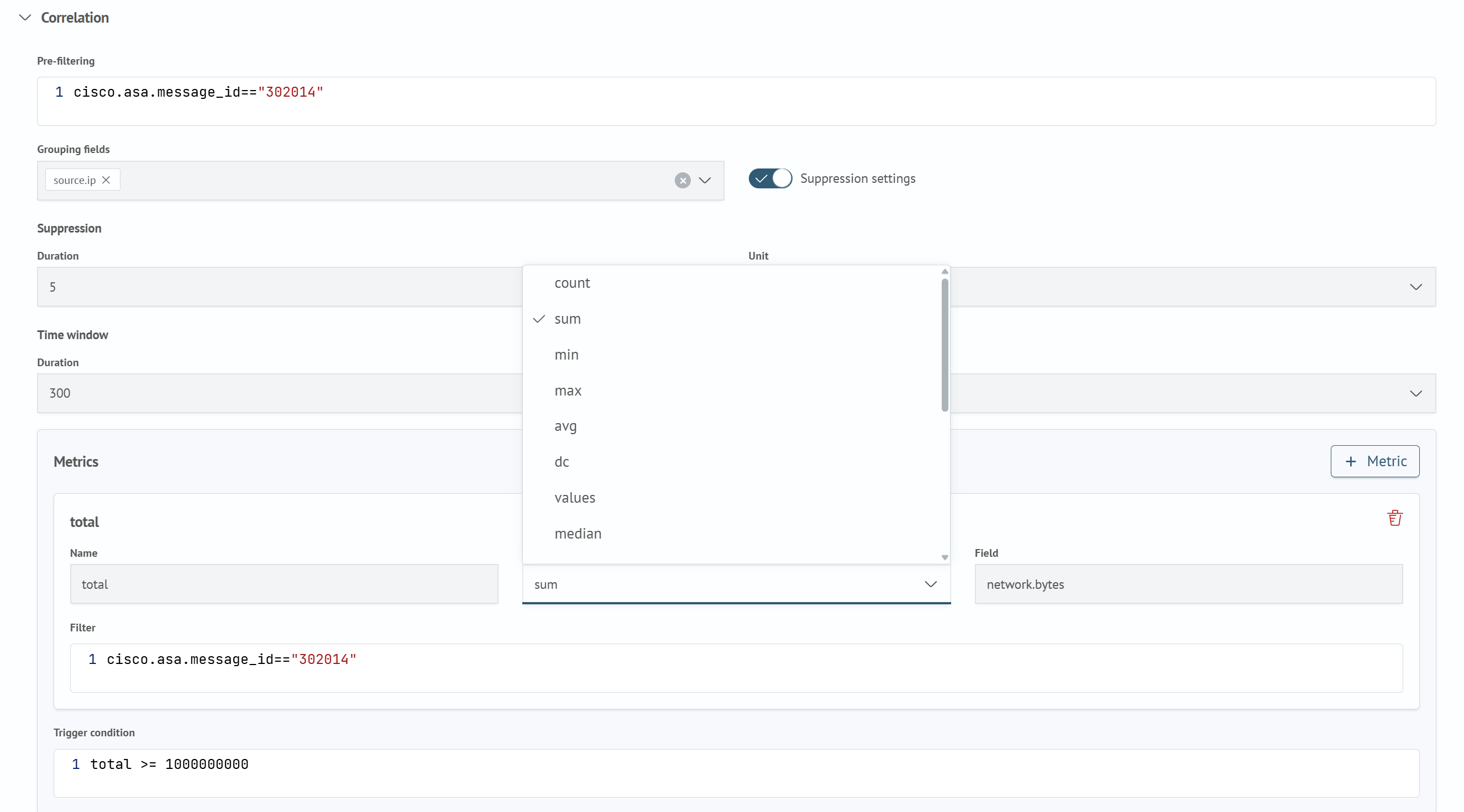
On the Correlation tab, define the window in which the correlator collects data for aggregation:
- In
Pre-filter, enter an expression in the SAFL (RTC) dialect. An event must match this expression to be included in the aggregation window - Select
Grouping Fields, which are field chips used to maintain a separate aggregate. A separate set of metrics is calculated and a separate firing is generated for each combination of these field values - Set the
Time Windowusing theDurationandUnitfields. This is the interval during which the correlator accumulates events for metric calculation - If necessary, enable
Suppression Settings, and complete theDurationandUnitfields in theSuppressionsection that appears, as for a declarative rule. See Declarative Rules. After a firing, subsequent firings for the same group are suppressed for the specified period
Metrics
In Metrics, configure one or more aggregates whose values determine whether the rule fires:
- Click
Metricto add a metric section - Enter a
Name. The metric value is available under this name inFiring Conditionand in the firing document - Select a
Function. The available functions are listed below - Specify a
Field, which is the event field used by the function.Fieldis optional only forcountandrate. If it is specified for these functions, only events containing that field are included in the calculation - If necessary, enter a
Filter, which is a metric-specific event selection condition in the SAFL (RTC) dialect. If no filter is specified, the metric is calculated from all events that passedPre-filter
Aggregation Functions
The Function field offers functions in the following order:
| Function | What it calculates | Field | Result type |
|---|---|---|---|
count | the number of events in the window | not required | integer |
sum | the sum of the field values | required | number |
min | the smallest field value | required | number |
max | the largest field value | required | number |
avg | the average field value | required | number |
dc | the number of distinct field values | required | integer |
values | the list of distinct field values | required | list |
median | the median of the field values | required | number |
p95 | the 95th percentile of the field values | required | number |
p99 | the 99th percentile of the field values | required | number |
variance | the variance of the field values | required | number |
stddev | the standard deviation of the field values | required | number |
first | the field value from the first event in the window | required | as in the event |
last | the field value from the last event in the window | required | as in the event |
earliest | the smallest numeric field value, typically the earliest timestamp | required | number |
latest | the largest numeric field value, typically the latest timestamp | required | number |
rate | the average event frequency: the number of events divided by the window length in seconds | not required | number |
Differences that matter when choosing a function:
firstandlasttake the field value as is, in the order the events arrive, and work with any type.earliestandlatestcompare values as numbers and return the extremes, so they apply to timestamps and other numeric fields but not to stringsminandmaxproduce the same result asearliestandlatest; the separate names exist to keep rules over time fields readable- events in which the field is absent or cannot be converted to a number are excluded from numeric function calculations
- the number of distinct values that
dcandvaluestrack per group is limited by thecorrelation.max_aggregation_set_per_groupcluster setting (default:100000). See Cluster Settings. Once the limit is reached, new values are not counted
Firing Condition
In Firing Condition, enter an expression that uses metric names, for example, total >= 1000000000. It is evaluated after the window metrics have been calculated and determines whether a firing is generated.
Firing Condition is evaluated against the names specified in the Name field of each metric, not against event fields. The field mapping described in Rules does not apply to this condition.