Models List
The page is designed for viewing, searching, and managing models. It is one of the entry points for working with models and services.
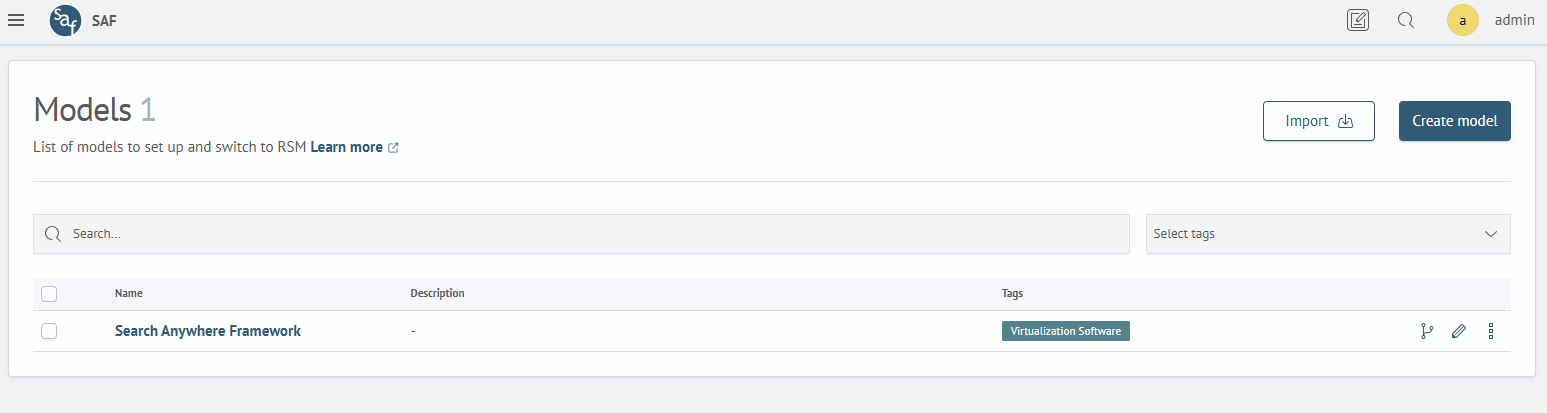
Model
A model is a kind of container that allows you to combine multiple monitoring objects, even if they have no explicit dependencies on each other.
Purpose
A model allows you to:
- monitor multiple objects simultaneously without having to switch between models
- configure a role model for access control
Action Panel

The following actions are available:
Create Model- transition to the model creation page (see section creating and editing a model)Import- import a model with all services and connections in JSON format
Models Table

The table contains a list of models and their main parameters.
Interface Overview
The main table contains the following columns:
| Name | Description |
|---|---|
| Name | Model name |
| Description | Brief explanation of what this model is intended for (optional field) |
| Tags | Tags assigned to the model |
Filtering
The Search... field allows you to filter the list by name or description.
The Select tags filter allows you to filter the list of models by tags.
You can select multiple values from the list, which is formed based on tags used in models.
Sorting
The table can be sorted by the Name field.
Individual Actions
The following actions are located at the end of each row:
Health Model- transition to the "Health Model" page for this modelEdit- transition to the model editing pageAdditional actions:Configure Access- configure read or write permissions by rolesChange Tags- configure tags for the modelExport- export the model in JSON formatDelete- delete the model
Viewing model services: clicking on the model name in the table opens the service details page for this model.
More details can be found on the model services view page.
Bulk Actions

You can perform actions on multiple models at once:
- Select models: Check one or more models using the checkboxes in the first column
- Actions with selected: after selection, the bottom panel becomes active:
- Delete models: deletes selected models
- Reset selection: deselects models