Painless Scripts
Painless — is a built-in scripting language designed for secure, fast, and convenient execution of custom computations directly within the search engine. Unlike more general languages (Groovy, JavaScript, or Python), Painless is optimized for real-time data processing and aggregation tasks: it compiles into JVM bytecode, supports strong typing, and enforces strict security constraints (sandbox), reducing the risk of executing potentially dangerous code.
This article covers the Painless syntax, methods for its integration into queries and aggregations, and provides practical examples of using Painless scripts.
Painless Syntax Basics
Painless uses familiar Java constructs while ensuring security and high performance. Scripts consist of variable declarations, arithmetic and logical expressions, control structures, and interactions with documents and parameters.
Variable Declaration and Data Types
When working with a script, variables are created and types are assigned immediately, for example:
// Primitives
int count = 0;
long hits = doc['views'].value;
double price = params.basePrice;

// Reference types and automatic type inference
String status = 'new';
List tags   = new ArrayList();
Map extras = params;
def total = price * params.markup;
Operators and Expressions
Painless supports standard arithmetic (+, -, *, /, %), logical (&&, ||, !), and comparison (==, !=, <, >, <=, >=) operators. The ternary operator is convenient for simple conditions:
// If the anomaly score exceeds the threshold - mark as critical
def status = anomalyHits > params.criticalThreshold ? 'CRITICAL' : 'NORMAL';
Control Structures
Full-featured if/else statements and loops (for, while) allow implementing logic directly in queries and updates:
// Conditional logic when updating a document
if (ctx._source.login_failures > params.maxFailures) {
    ctx._source.account_status = 'locked';
} else {
    ctx._source.account_status = 'active';
}

// Loop over indexed values
for (int i = 0; i < items.size(); i++) {
    ctx._source.total += items.get(i);
}

// for-each for collections
for (def tag : tags) {
    ctx._source.tags.add(tag.toLowerCase());
}
Working with Documents and Parameters
In Painless, you can access script parameters via the params object, access fields stored in the document via doc['field'].value, and when updating, modify the source document via ctx._source.
// Reading event time and calculating processing delay
def eventTime    = doc['@timestamp'].value.toInstant().toEpochMilli();
def currentTime  = params.nowMillis;
ctx._source.latencyMs = currentTime - eventTime;

// Filtering by user and updating the counter
if (params.userName == doc['user.name.keyword'].value) {
    ctx._source.userEventCount = doc['user.eventCount'].value + 1;
}
Stored Scripts and Reusability
For centralized storage and reuse, Painless scripts can be saved in the cluster:
PUT _scripts/calc_tax
{
  "script": {
    "lang": "painless",
    "source": """
      double rate = params.rate;
      return params.amount * (1 + rate);
    """
  }
}
The PUT _scripts/<script_id> command registers the script in the cluster and assigns it a unique identifier.
Stored scripts are convenient to use in various scenarios: for calculating values, sorting, filtering, aggregating, and updating documents. When executing queries, it's sufficient to specify its id and pass the necessary parameters:
GET products/_search
{
  "query": {
    "match_all": {}
  },
  "script_fields": {
    "price_with_tax": {
      "script": {
        "id": "calc_tax",
        "params": {
          "amount": 120,
          "rate": 0.18
        }
      }
    }
  }
}
The provided example uses the stored script calc_tax. The query performs simple filtering via match_all. In the script_fields section, a new calculated field price_with_tax is created using the script.
These Painless mechanisms enable writing scripts for filtering, sorting, aggregating, and updating data in Search Anywhere Framework.
Painless Scripts in Search Anywhere Framework
Painless script management in Search Anywhere Framework is available in the section: Main menu - Settings - Management — GENERAL — Painless.
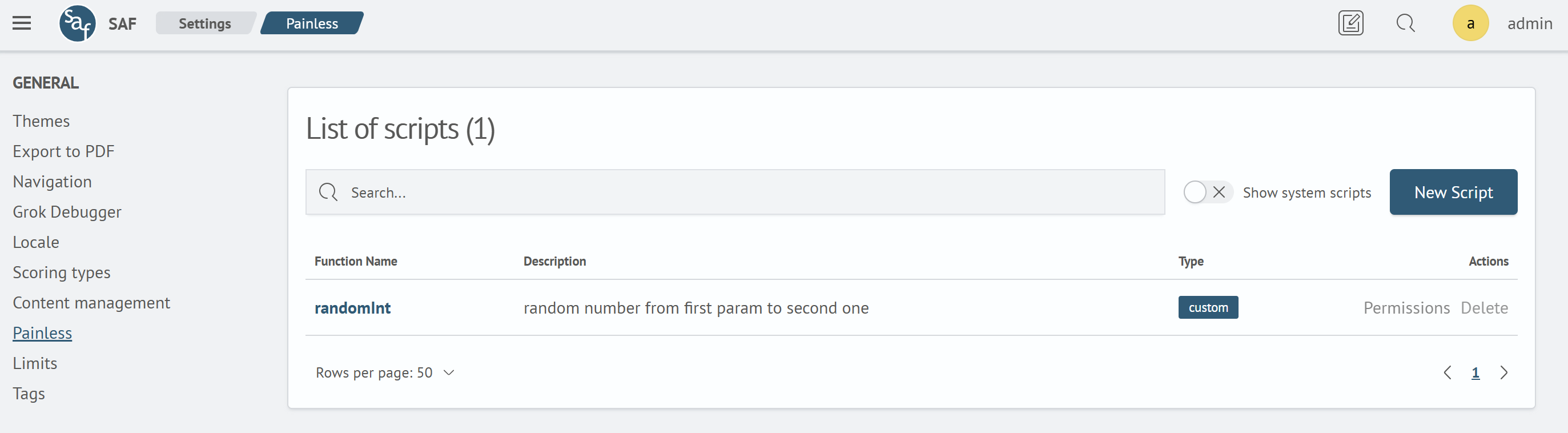
The interface displays a list of created Painless scripts.
In addition to custom scripts, the interface can also display system scripts. To do this, activate the Show system scripts. button. System scripts have the type internal. In the resulting list, you can find the desired function and study its features in more detail.
System scripts cannot be deleted or edited.
Creating Painless Scripts
To create a new Painless script:
- Click the `New Script
- Fill in the fields in the editor
- Click the
Savebutton in the editing form
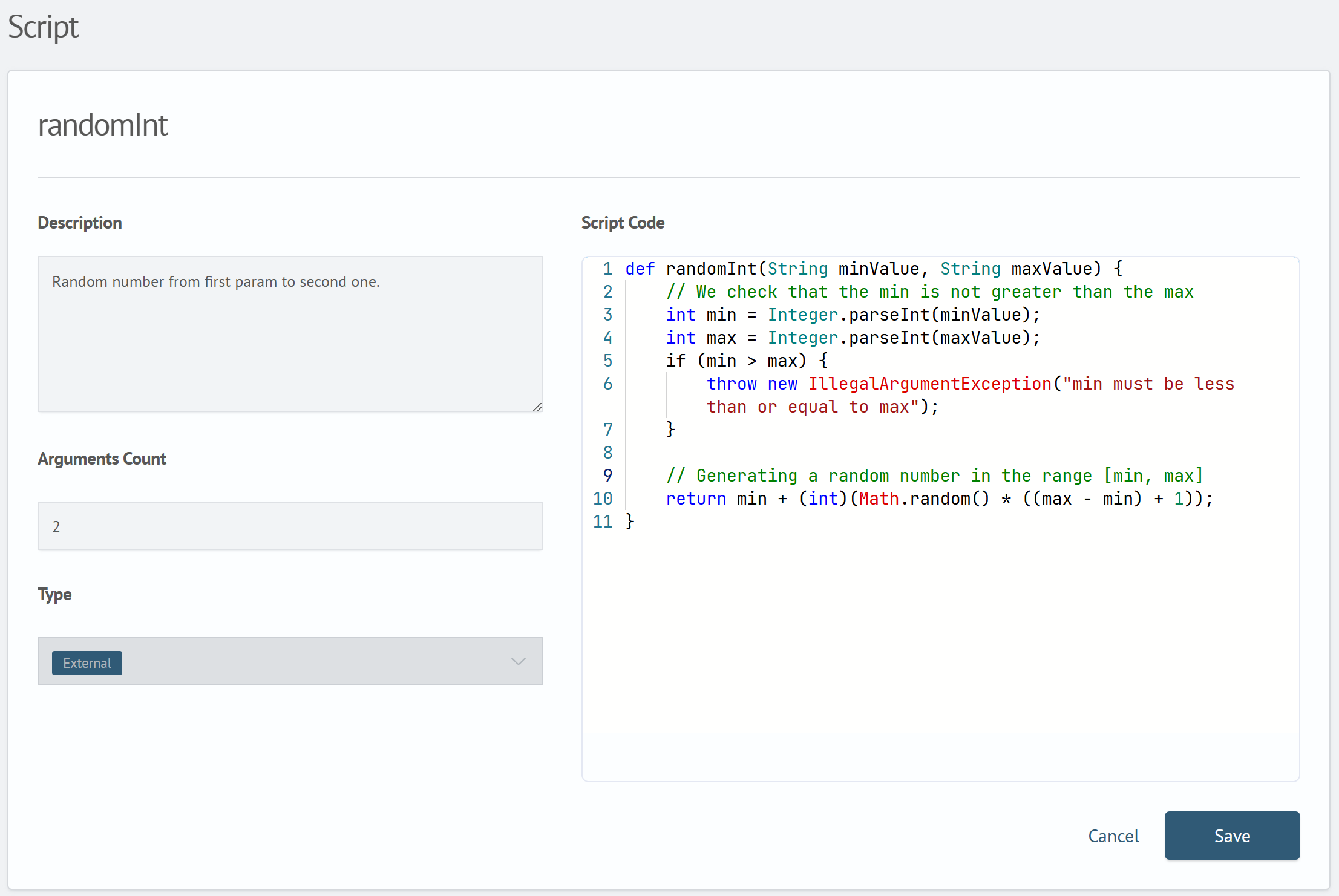
The script editor consists of five sections:
Function Name— the name used to call the script in search queriesDescription— description of the painless script's functionalityScript Code— the script code in Painless languageArguments Count— the number of arguments the function acceptsType— the tag displayed in the script list
Created Painless scripts are saved in the system index .sm_sme_scripts.
Integrating Painless Scripts into Queries
Scripts created in Search Anywhere Framework can be used directly in search queries using the peval command.
Painless Script Application Mechanisms
When working with Painless scripts, you can use special mechanisms that allow creating additional fields during query execution, setting custom ranking formulas, and automatically correcting thousands of documents with a single query.
Let's consider the main mechanisms for integrating Painless scripts into queries.
- Virtual Fields via script_fields
In the search request body, you can specify a "script_fields" section that defines the names of virtual fields and their corresponding Painless scripts. These scripts are executed for each document during the search, while the documents themselves are not modified.
GET /my_index/_search
{
  "_source": ["timestamp","eventType","metricValue"],
  "script_fields": {
    "level": {
      "script": {
        "lang":   "painless",
        "source": """
          // calculated level: 'HIGH' if value exceeds threshold, otherwise 'LOW'
          return doc['metricValue'].value > params.threshold
            ? 'HIGH'
            : 'LOW';
        """,
        "params": { "threshold": 100 }
      }
    }
  },
  "query": { "match_all": {} }
}
As a result of executing this command, each found document will have a fields.level value added: HIGH if else metricValue field is greater than 100, or LOW otherwise. The source data in the index remains unchanged. The fields key is generated by the search engine and contains stored results of all script_fields. The name level in fields.level corresponds to the field name in the query - script_fields.level.
- Custom _score Calculation via script_score
The built-in calculation of the _score metric, which determines the order of search results, can be replaced or supplemented with a custom formula. For this, the function_score section is used inside script_score.
GET /my_index/_search
{
  "query": {
    "function_score": {
      "query": { "match": { "eventType": "authentication" } },
      "script_score": {
        "script": {
          "lang":   "painless",
          "source": """
            // base score + 0.5 points for each error
            double base  = params.baseScore;
            int    errs  = doc['errorCount'].value;
            return base + errs * params.errorWeight;
          """,
          "params": {
            "baseScore":   1.0,
            "errorWeight": 0.5
          }
        }
      }
    }
  }
}
In the provided example, each document where eventType equals "authentication" will receive a _score value calculated as 1.0 + errorCount × 0.5. Results will be sorted by the new _score.
- Bulk Updates via update_by_query
The update_by_query method allows applying a Painless script to all documents matching a specified condition and saving the changes to the index. This is convenient when you need to bulk update a field, set flags, or correct data without manually loading and processing documents.
POST /my_index/_update_by_query
{
  "query": {
    "term": { "status": "pending" }
  },
  "script": {
    "lang":   "painless",
    "source": """
      //  get current counter (or initialize)
      int cnt = ctx._source.processedCount != null
                ? ctx._source.processedCount + 1
                : 1;
      ctx._source.processedCount = cnt;
      // if more than three processes - mark for review
      if (cnt > params.max) {
        ctx._source.flag = 'review';
      }
    """,
    "params": { "max": 3 }
  }
}
As a result of executing this command, all documents with status = "pending" will be updated: the processedCount field will be incremented by 1 (or set to 1 if previously absent), and when the value exceeds 3, flag will be written to the 'review' field.
- Filtering and Sorting Using Scripts
Painless scripts can be used in queries to define flexible filtering and sorting conditions. This is useful when you need to consider not only the field value but also additional parameters, transformations, or formulas.
GET /my_index/_search
{
  "query": {
    "script": {
      "script": {
        "lang": "painless",
        "source": "doc['metricValue'].value * params.coeff > params.threshold",
        "params": {
          "coeff": 1.2,
          "threshold": 100
        }
      }
    }
  }
}
In the provided example, only documents where metricValue multiplied by coefficient 1.2 exceeds 100 are returned. Such filtering is convenient when the condition depends on parameters rather than a specific field value.
- Aggregations Using Scripts
Painless scripts can be used in aggregations, for example:
- to calculate values based on multiple metrics
- to combine values
- for dynamic bucketing
Example: Dynamic document grouping based on a calculated condition defined by a script.
GET /my_index/_search
{
  "size": 0,
  "aggs": {
    "dynamic_groups": {
      "terms": {
        "script": {
          "lang": "painless",
          "source": """
            return doc['metricValue'].value > 100 ? "high" : "low";
          """
        }
      }
    }
  }
}
The result will be an aggregation into two groups: "high" and "low", determined by the script logic rather than a fixed field value.
- "On Ingest" Transformation via Ingest Pipeline
When using ingest pipelines, Painless scripts are executed before documents are saved to the index. This allows enriching or normalizing fields during query execution.
PUT _ingest/pipeline/normalize-metric
{
  "description": "Normalize metricValue to range 0-1",
  "processors": [
    {
      "script": {
        "lang": "painless",
        "source": """
          // if metricValue exists - divide by maximum 200, otherwise 0
          def v = ctx.metricValue != null ? ctx.metricValue : 0;
          ctx.metricValueNorm = v / 200;
        """
      }
    }
  ]
}
When a document is sent to the index with the normalize-metric pipeline specified, the script in this pipeline normalizes the metricValue, adding a newmetricValueNorm field to the document.
POST /my_index/_doc?pipeline=normalize-metric
{ "metricValue": 150, "eventType": "login" }
In the provided example, the result will be metricValueNorm: 0.75:
All ingest methods available in Painless are limited to the Processors namespace.
- Runtime Fields
Runtime fields are defined in the index mappings and are calculated by a Painless script each time a query is executed. Unlike script_fields, you don't need to include the script in the request body each time to use them - they are immediately present in the schema and available for filtering conditions, aggregations, and sorting.
PUT /my_index
{
  "mappings": {
    "runtime": {
      "level": {
        "type":   "keyword",
        "script": {
          "lang": "painless",
          "source": """
            // level 'high' if metricValue > 100, otherwise 'low'
            emit(doc['metricValue'].value > params.threshold
              ? 'high'
              : 'low');
          """,
          "params": { "threshold": 100 }
        }
      }
    }
  }
}
After this, the level field can be immediately used in queries:
GET /my_index/_search
{
  "query": {
    "term": { "level": "high" }
  }
}
Debugging Painless Scripts
Debugging Painless scripts is performed to identify and eliminate errors, verify logic correctness, and assess code performance before implementing it in production workflows.
Execute API
The Execute API (POST /_scripts/painless/_execute) allows executing arbitrary Painless scripts independently of indexes and data. It enables you to:
- quickly check syntax and basic code logic
- verify that expressions return expected values
- simulate different contexts (filtering, scoring, aggregations, updates) before integrating into real queries
The general request structure looks like this:
POST /_scripts/painless/_execute
{
  "context": "<context_name>",
  "context_setup": {
    "index":    "<index_name>",
    "document": { /* sample document */}
  },
  "script": {
    "lang":   "painless",
    "source": "<кscript_code>",
    "params": { /* parameters  */ }
  }
}
context— the environment in which the script executescontext_setup— used to set up the test environment: index and document that the script will work with. This is necessary when usingdoc['field']andctx._sourcescript.source— custom Painless codeparams— object containing custom parameters passed to the script from the request
In some scenarios, advanced parameters may be used, such as query — for passing conditions in scripts with score context, or emit — for outputting values in runtime fields.
If context_setup parameter is mandatory for all contexts except painless_test. It specifies the test index and document required for proper script execution simulation.
If context is not specified, painless_test is used by default.
Available contexts are shown in the table below:
| Context | Available Objects | Purpose |
|---|---|---|
| painless_test | params | Basic arithmetic and logic testing |
| filter | doc, params | Filter condition verification |
| score | doc, params, _score | script_score testing |
Below is an example of running the Execute API in a filter verification context. The script should return true if the test document'smetricValue field exceeds the specified threshold.
POST /_scripts/painless/_execute
{
  "context": "filter",
  "context_setup": {
    "index": "my_index",
    "document": {
      "metricValue": 120
    }
  },
  "script": {
    "source": "doc['metricValue'].value > params.threshold;",
    "params": {
      "threshold": 100
    }
  }
}
As a result of executing this request, the response will contain:
{
  "result": true
}
The result: true field confirms that the script condition (metricValue > 100) is correct for the provided document.
Contextual Debugging with Debug.explain()
When testing requires knowing not only the script result but also the internal structure of objects (ctx._source, doc, params, etc.), the special function Debug.explain() helps. It generates a ScriptException containing:
- serialized (JSON-like) representation of the specified object
- information about the object's class (e.g.,
java.util.LinkedHashMapfor_source) - script call stack - a list of strings reflecting the execution path and indicating which script line called
Debug.explain(). This helps precisely determine the location and context of the debug function call
Example of executing a request with Debug.explain():
POST /my_index/_update/1
{
  "script": {
    "lang":   "painless",
    "source": "Debug.explain(ctx._source);"
  }
}
As a result of executing the request, the script immediately generates an exception containing the string representation of the _source object, including its fields, values, and data types. This allows verifying what data is available within the script and how exactly it's represented. This technique is particularly useful when working with nested objects or dynamically changing document schemas.
Example error fragment:
{
  "error": {
    "root_cause": [
      {
        "type": "script_exception",
        "reason": "RuntimeException[LinkedHashMap] {user=alice, count=5}"
      }
    ],
    "script_stack": [
      "Debug.explain(ctx._source);",
      "               ^---- HERE"
    ],
    ...
  }
}
The provided error fragment demonstrates the result of Debug.explain(ctx._source). In the reason field, you can see the serialized contents of the _source object: it's a LinkedHashMap with fields user=alice and count=5, confirming the presence of this data in the document. The object type (LinkedHashMap) is also indicated, which is important when diagnosing field access issues - especially if type errors occur or attempts to access non-existent keys.
The script_stack displays the script line that caused the exception and the point where it was generated. This helps quickly locate the debug call within a large script.