Grok Debugger
Grok Debugger is a tool for interactively creating and testing Grok patterns used for parsing unstructured text messages. It allows you to develop expressions that extract structured fields from text, check the correctness of pattern matching, and troubleshoot parsing errors.
This article describes working with the Grok Debugger interface, pattern syntax, basic Grok pattern types, special character escaping rules, and optimization recommendations. Examples of log parsing with explanations are also provided.
Using Grok Debugger
Grok Debugger is available in the section: Main Menu - Settings - Management - General - Grok Debugger.
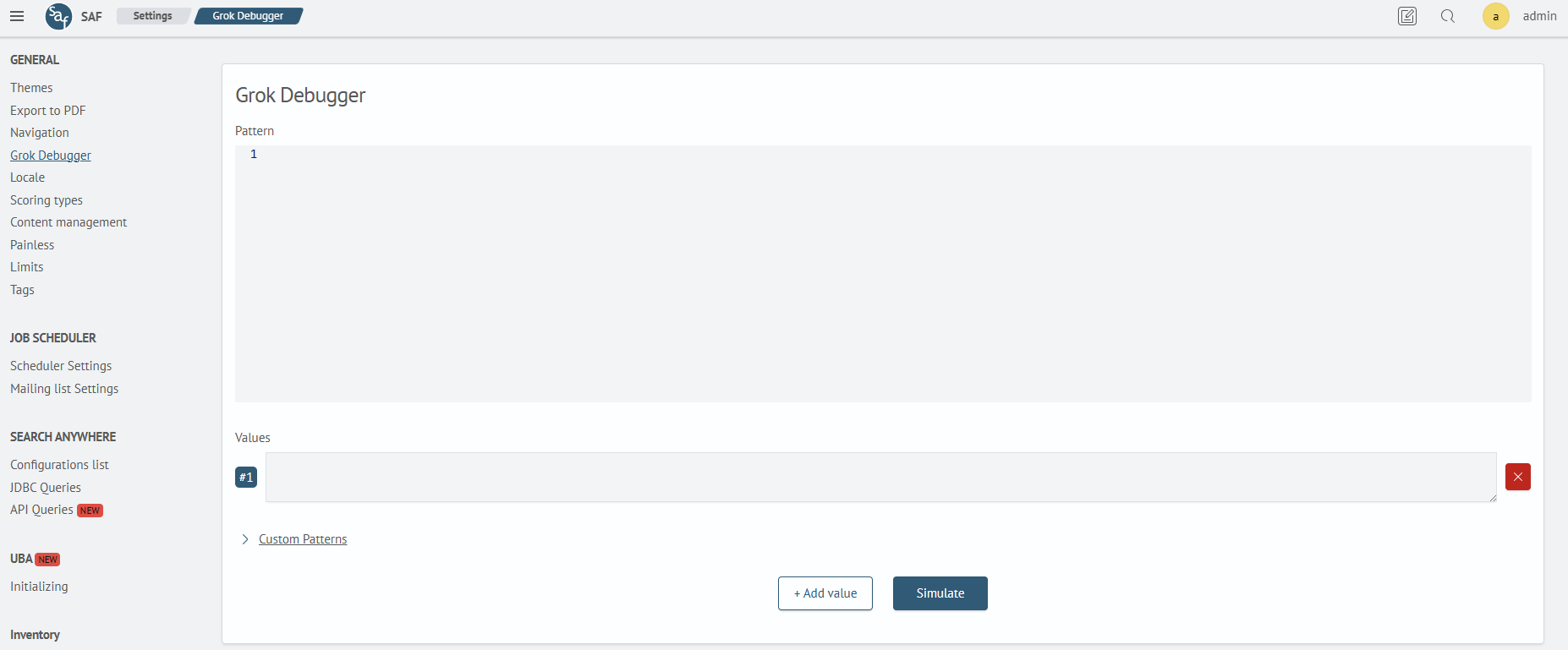
The Grok Debugger page contains four areas: Grok Pattern, Values, Custom Patterns, and Results.
Grok Pattern is used to input the main expression for log parsing. Primitives (%{IP}, %{INT}, %{DATA}, etc.) are combined into a single chain that defines the field capture sequence.
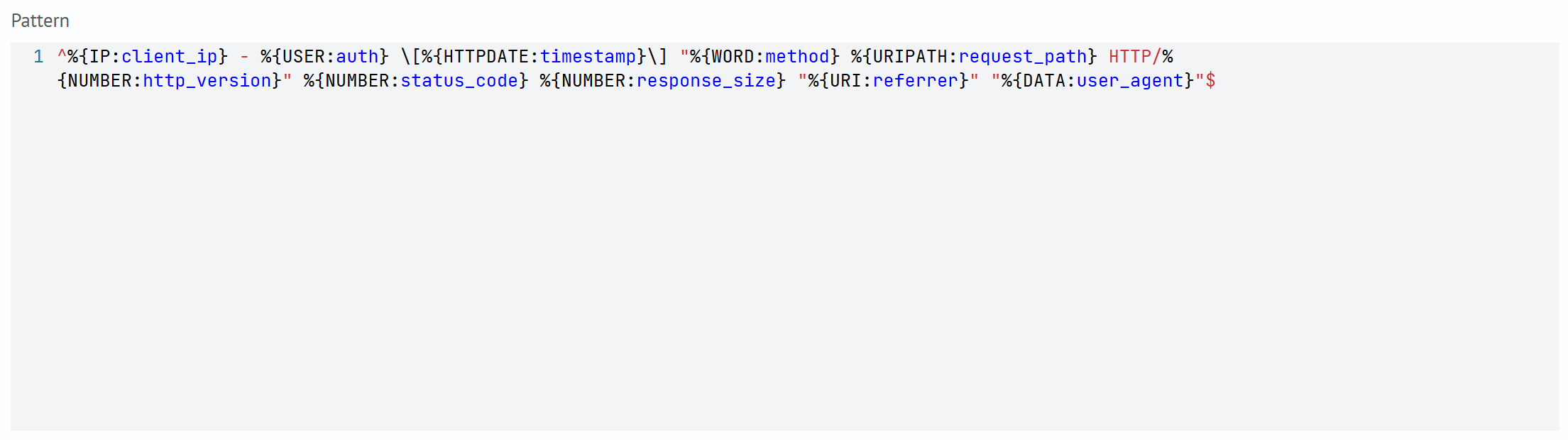
Only one Grok pattern is allowed in the Grok Pattern area.
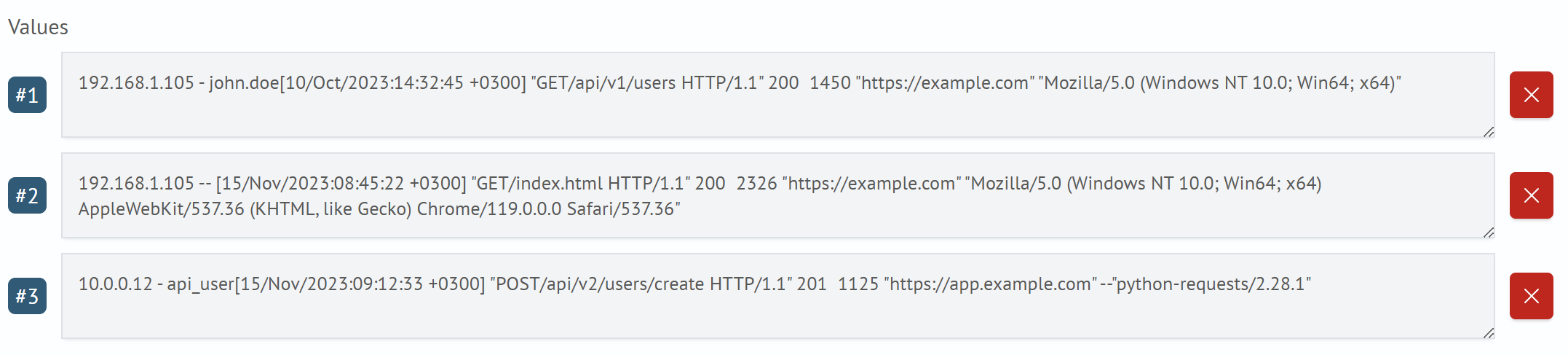
Test Values accepts one or more message strings. This data is fed into the Grok pattern and custom definitions. To add a new test value, click the + Add Value button and enter a new message in the appeared line.
Custom Patterns allow you to declare a set of reusable constructs, each defined in the format FIELD_NAME %{GROK_TYPE:field_name}. You can reference them by name in the base expression, which simplifies maintenance and improves the readability of the main pattern.

The Results area displays a JSON object with named fields and their values obtained after applying the Grok pattern to the test strings. If a message parsing error occurs, a corresponding message appears in the results field: Provided Grok expressions do not match field value: .... The parsing result can be opened in full-screen view.
Working with Grok Patterns
A Grok pattern is a string consisting of built-in or custom patterns enclosed in the form %{PATTERN:field_name}. When parsing a log, the Grok pattern sequentially attempts to match the text and extract values into named fields.
Grok patterns are a convenient abstraction layer over regular expressions. Each built-in Grok pattern (e.g., BASE10NUM, IP, UUID) represents a fragment of a regular expression. For example:
- NUMBER = (?:%{BASE10NUM})
- BASE10NUM = (?<![0-9.+-])(?>[+-]?(?:(?:[0-9]+(?:\.[0-9]+)?)|(?:\.[0-9]+)))
Pattern Syntax
Declaring a Standard Pattern
%{PATTERN} — insertion of one of the predefined Grok primitives (IP, WORD, INT, DATA, etc.).
Field Binding
%{PATTERN:field_name} — when matched, the text is saved in the field field_name.
Custom Pattern
%{USER_PATTERN} or %{USER_PATTERN:name} — reference to a defined custom pattern.
Optional Fragments
(?: ... )? — a non-capturing group that matches a fragment if it is present. The quantifier ? means the group can occur 0 or 1 time.
Alternatives
(?:foo|bar) — a group matching one of the options (in the given example, foo or bar).
Basic Pattern Types
Below are the most commonly used predefined Grok patterns. Each one allows extracting common data types from text messages and is illustrated with an example.
| Pattern | Description | Example |
|---|---|---|
WORD | A sequence of alphanumeric characters and underscores | admin_user |
INT | Integer number | 404, 123 |
NUMBER | Integer or fractional number | 3.14, -10 |
DATA | Any sequence of character | will capture everything until the end of the line or until the next pattern match |
NOTSPACE | Any non-bracket string without spaces | will capture until a space |
IP | IPv4 address | 192.168.0.1 |
HOSTNAME | Hostname | server-1.local |
UUID | Universally unique identifier | 123e4567-e89b-12d3-a456-426614174000 |
HTTPDATE | Timestamp in the format day/month/year:hour:minute:sec+zone | 18/Jun/2025:11:27:27 +0000 |
TIMESTAMP_ISO8601 | ISO format date/time pattern | 2025-07-03T12:34:56.789Z |
GREEDYDATA | Any sequence of characters (greedy capture) | will capture everything until the end of the line or until the last match of the following pattern |
For optimal performance, it is recommended to prefer specialized patterns (WORD, INT, IP, etc.) and minimize the use of greedy types such as GREEDYDATA, as they can significantly slow down text message parsing.
Using Regular Expressions Inside Grok Patterns
In addition to built-in patterns (%{WORD}, %{IP}, etc.), Grok patterns allow the use of regular regular expressions (regex) — including named groups and logical constructs.
This is useful when a predefined Grok pattern is insufficient or stricter value validation is required.
For example, for the string:
sessionID=QZA-7513 STATUS=FAIL user=admin ip=10.0.0.5
You can use the following pattern:
^sessionID=%{WORD:prefix}-%{INT:session} STATUS=(?<status>OK|FAIL) user=%{WORD:user} ip=%{IP:ip_address}$
Here:
-
(?<status>OK|FAIL)— is a regular expression with a named groupstatus_text, allowing only two valid values:OKorFAIL -
other fields are extracted using standard Grok patterns
Features of Using RegEx
Regular expressions can be freely inserted into the body of a Grok pattern and combined with Grok primitives. This is especially useful when strict value format conditions need to be set or allowed options need to be limited. Named groups of the form (?<field_name>...) allow extracting data into fields just like %{PATTERN:field_name}, but with greater flexibility — for example, when checking if a value belongs to a fixed set, as in the (?<status>OK|FAIL) construct..
Escaping Special Characters
Sometimes logs contain characters that have special meaning in regular expressions and Grok patterns and therefore require escaping. For example, the string:
[WARN] service started at 2025-07-04T12:01:31Z
Contains square brackets, which without escaping Grok will interpret as the start and end of a character class. To correctly parse the logging level WARN, the pattern must be defined as:
\[%{WORD:level}\] %{GREEDYDATA:message}
In this case, escaping \[ and \] allows searching for literal [ and ] characters, rather than interpreting them as metacharacters defining a character class (range).
When parsing fields wrapped in double quotes, it is necessary to escape the " character with a backslash, otherwise the Grok parser will consider the quote as part of the pattern syntax. For example, for the string:
user="alice" action="login"
The correct pattern looks like this:
user=\"%{WORD:username}\" action=\"%{WORD:action}\"
Without escaping (\") the Grok interpreter will try to interpret " as a literal boundary or throw a parsing error.
Escaping is also required for the following characters: ., \, +, *, ?, {, }, (, ), ^, $.
Text Message Parsing Examples
Below are typical examples of using Grok patterns for parsing text messages.
Parsing Apache Log
Message:
10.19.86.202 - - [18/Jun/2025:11:27:27 +0000] "GET /index.html HTTP/1.1" 200 1024
Grok pattern:
^%{IP:client} - - \[%{HTTPDATE:timestamp}\] "%{WORD:method} %{URIPATH:request} HTTP/%{NUMBER:version}" %{INT:status} %{INT:bytes}$
This pattern uses precise types (IP, HTTPDATE, INT) without greedy patterns. Escaped brackets and quotes fix the record structure.
When working with Grok patterns, it is recommended to explicitly specify string boundaries using anchors ^ and $. Without these symbols, the Grok engine will search for matches in any part of the string, which, if the pattern doesn't match, can lead to many unnecessary matching attempts. This significantly reduces performance — especially during mass log processing — and can slow down parsing by 6–10 times. Using anchors limits the parsing area, allows faster discarding of unsuitable records, and increases text parsing speed.
Parsing Log Using Custom Pattern
Message:
event=login user=admin ip=192.168.1.100
Custom pattern:
LOGKV %{WORD:key}=%{DATA:value}
Grok pattern:
^%{LOGKV:event} %{LOGKV:user} %{LOGKV:ip}$
The custom pattern LOGKV defines the key=value format, where key and value are independent fields. It is reused three times, making the main pattern compact and readable. This is especially useful in logs where the format repeats with different fields.
Parsing Log Using Regular Expressions and Grok Patterns
Log:
sessionID=QZA-7513 STATUS=FAIL user=admin ip=10.0.0.5
Grok pattern:
^sessionID=%{WORD:prefix}-%{INT:session} STATUS=(?<status>OK|FAIL) user=%{WORD:user} ip=%{IP:ip_address}$
The provided pattern combines Grok patterns and a regular regular expression with a named group (?<status_text>...). This approach allows using strict regex constraints on the status value while reusing ready-made Grok patterns for other fields. This improves pattern readability and allows precise control over field formats if the Grok primitive is too broad.