Role Model Settings
Roles in Search Anywhere Framework are sets of permissions that define user access to system functions and data. They allow for flexible security policy configuration by granting or restricting rights to:
- cluster management
- access to indexes and documents
- viewing and editing system objects
This article describes the following procedures:
- Creating a Role
- Assigning Permissions and Associating Users with Roles
- List of All Permissions
Getting Started with Roles
Navigate to Main Menu - Settings - Security - Rollup jobs, where all available roles will be displayed.
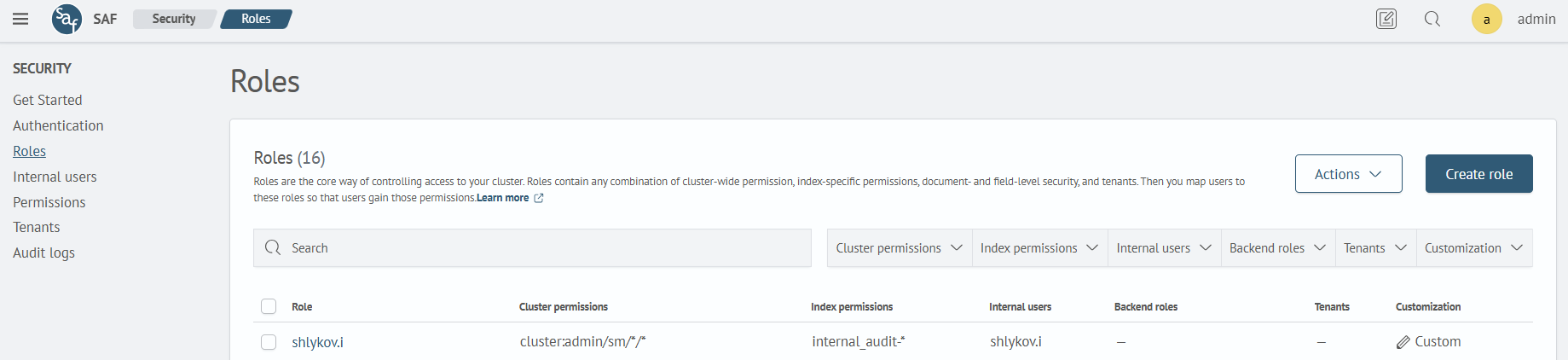
To start the process of creating a role for users, click Create Role or click on an existing role to edit it.
Creating a Role
On the creation page, specify the name of the role in the corresponding field and add permissions for the cluster, indices, and scope.
Specify a role name that describes its purpose. The role name cannot be changed after creation.
Cluster Permissions
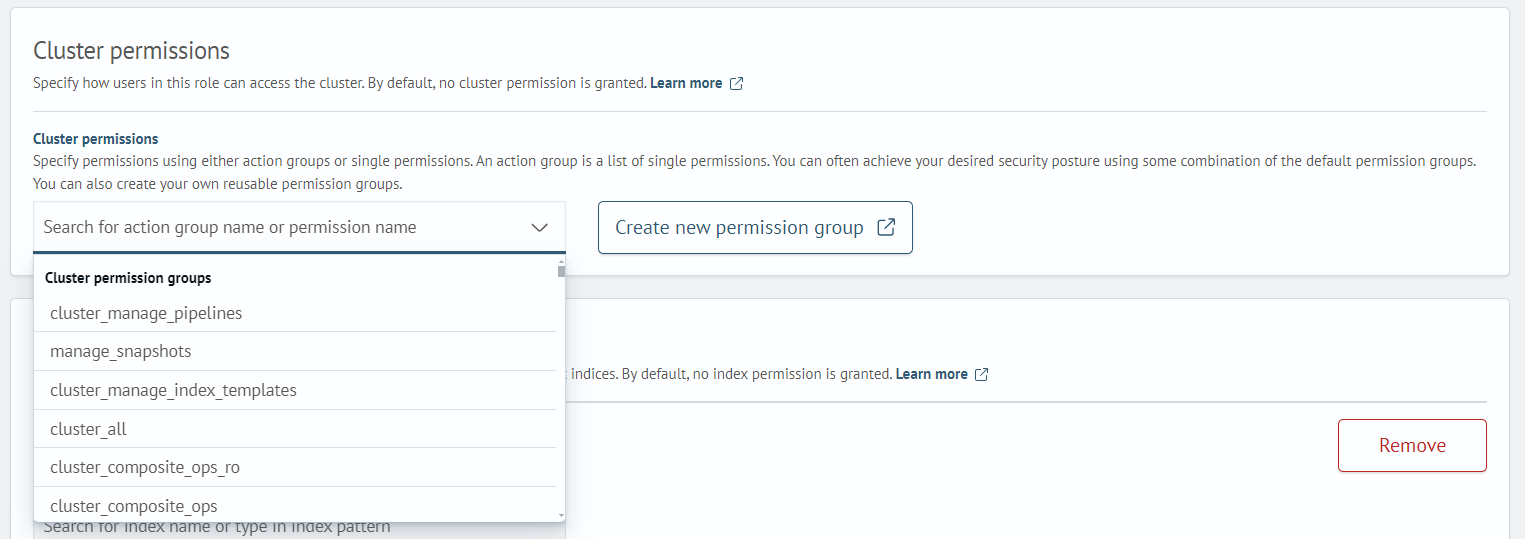
Permissions for the cluster can be set as a group of actions or as individual permissions. Action groups are a list of individual permissions. You can achieve the desired level of security by using some combination of the default permission groups.
Select the required group/permission from the list or create your own permission group by clicking Create New Permission Group.
Index Permissions
Index permissions define the specific actions allowed on particular indexes. By default, no index permissions are granted. Detailed information about index permission names and their descriptions begins in the Index Template Permissions section.
When creating a new role, the index permissions section already contains a list of parameters (Index, Index Permissions, Document-Level Security, Field-Level Security, Anonymization) for the first index permission. You can add new index permissions. To add a new permission, click Add Index Permission:
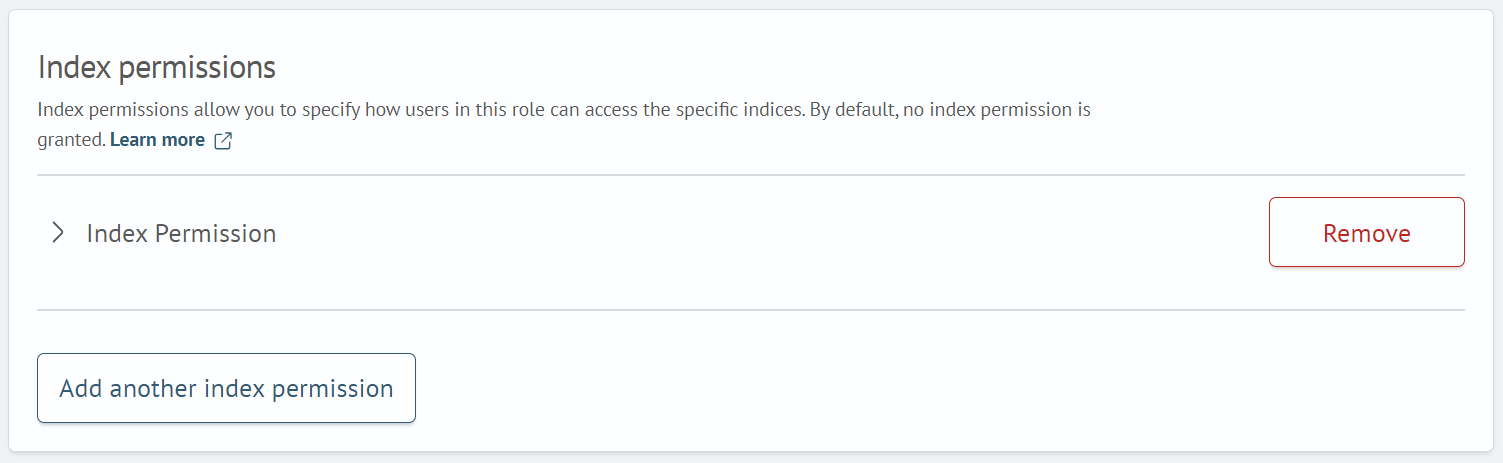
To enter data, you need to expand the Index Permission field group. After clicking, you will see the following fields to fill in:
-
Index — In this field, you must specify the name of the index or its pattern using wildcards (For example:
test_index_*will match all indices whose name starts withtest_index_) -
Index Permissions — Specifies the permission or group of permissions (see the Permissions section for more details)
-
Document Level Security (optional) — Allows you to restrict the role to a subset of documents. Example of a filter for documents where the
filenamefield contains the valuesecure_access.log:{
"bool": {
"must": {
"match": {
"filename": "secure_access.log"
}
}
}
} -
Field Level Security (optional) — Specify the document fields that the user will be able to see
-
Anonymization (optional) — Specify fields with sensitive data that need to be replaced with random values. This option hashes the field in search results
Editing a Role
To edit a role, click on the role name and on the opened page click the Edit Role button. The role editing page consists of two tabs: Permissions and Mapped Users:

On the Permissions tab, you can add permissions for the cluster, indices, and scope. Editing is done in the same way as creation. On the Mapped Users tab, you can add users to the edited role.
To assign a user, go to the Mapped Users tab and click Map user. On the opened page, specify users and backend roles by selecting them from the list or create a new one by clicking the corresponding button.
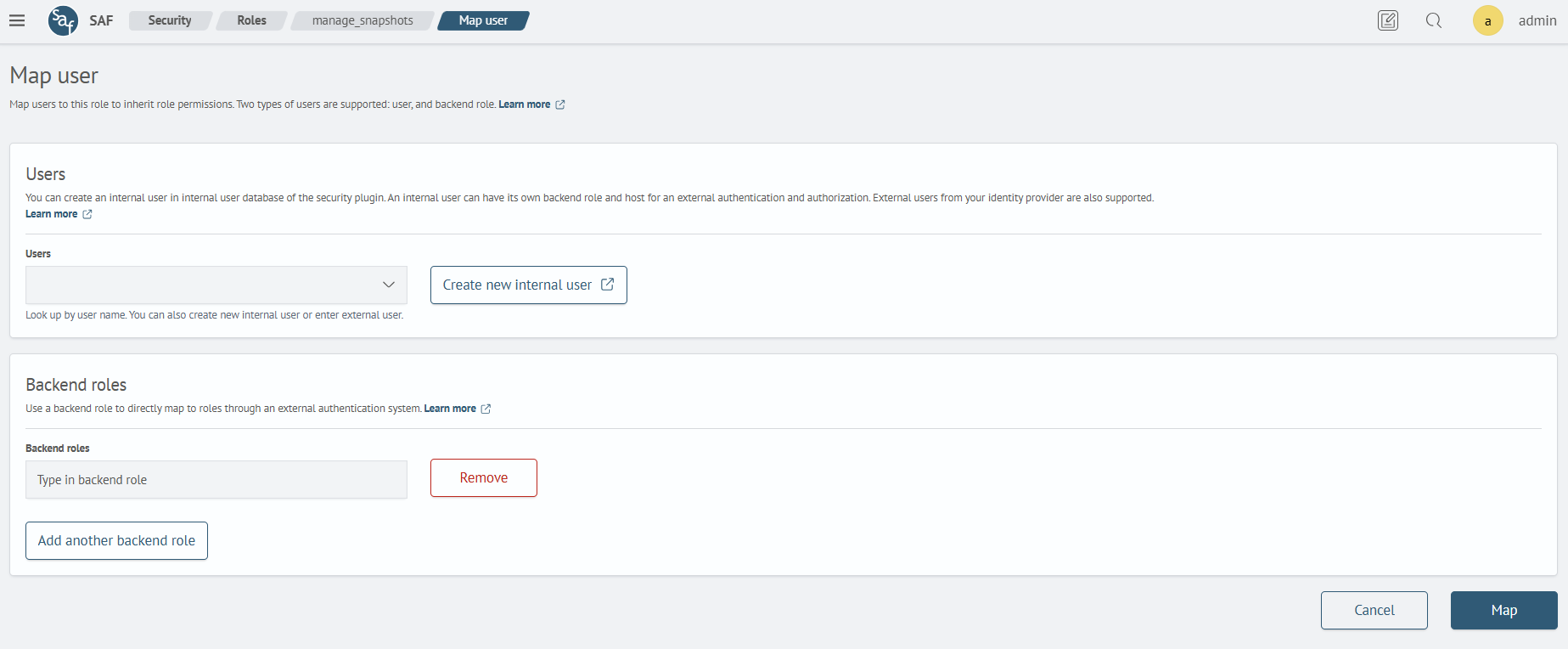
You can specify both an internal user and a user from Active Directory. After filling in the fields, click Map.
Permissions List
Ingest API Permissions
The Ingest API is a set of functionalities for loading data into the system. Ingest APIs allow you to work with ingest pipelines and ingest processors to process or transform data from various sources and in different formats. Detailed information is available in the OpenSearch official documentation.
| Name | Description |
|---|---|
cluster:admin/ingest/pipeline/delete | Deleting ingest pipelines |
cluster:admin/ingest/pipeline/get | Retrieving information about ingest pipelines |
cluster:admin/ingest/pipeline/put | Creating ingest pipelines |
cluster:admin/ingest/pipeline/simulate | Running or testing ingest pipelines |
cluster:admin/ingest/processor/grok/get | Access to retrieve information about grok processor used in Ingest pipelines. |
Asynchronous Search Permissions
Asynchronous Search is a set of functionalities that allow sending search queries to run in the background. Detailed information is available in the OpenSearch official documentation.
| Name | Description |
|---|---|
cluster:admin/opendistro/asynchronous_search/stats | Monitoring statistics for executed, completed, and saved asynchronous search queries |
cluster:admin/opendistro/asynchronous_search/delete | Deleting asynchronous search queries |
cluster:admin/opendistro/asynchronous_search/get | Retrieving information about asynchronous search queries |
cluster:admin/opendistro/asynchronous_search/submit | Submitting asynchronous search queries |
Index State Management Permissions
Index State Management (ISM) is a mechanism for managing the index lifecycle. Using ISM policies, you can automatically manage an index's state based on its condition. Detailed information is available in the OpenSearch official documentation.
| Name | Description |
|---|---|
cluster:admin/opendistro/ism/managedindex/add | Adding indexes to the managed (by policies) list |
cluster:admin/opendistro/ism/managedindex/change | Changing the list of managed (by policies) indexes |
cluster:admin/opendistro/ism/managedindex/remove | Removing indexes from the managed (by policies) list |
cluster:admin/opendistro/ism/managedindex/explain | Retrieving information about policy operation status |
cluster:admin/opendistro/ism/managedindex/retry | Retrying failed actions for managed (by policies) indexes |
cluster:admin/opendistro/ism/policy/write | Creating and modifying policies |
cluster:admin/opendistro/ism/policy/get | Retrieving information about policies |
cluster:admin/opendistro/ism/policy/search | Using queries to search for policies |
cluster:admin/opendistro/ism/policy/delete | Deleting policies |
Cross-cluster Replication Permissions
Cross-cluster replication is a mechanism that allows replicating indexes, mappings, and metadata from one cluster to another. Detailed information is available in theOpenSearch official documentation.
| Name | Description |
|---|---|
cluster:admin/plugins/replication/autofollow/update | Modifying the auto-replication configuration |
Reindexing Permissions
Data reindexing is the process of copying documents from one index to another. Detailed information is available in the OpenSearch official documentation.
| Name | Description |
|---|---|
cluster:admin/reindex/rethrottle | Changing the data reindexing speed. Detailed information on reindexing is available in the OpenSearch official documentation |
Snapshot Repository Permissions
Snapshot repositories are storage for OpenSearch data snapshots. Detailed information is available in the OpenSearch official documentation.
| Name | Description |
|---|---|
cluster:admin/repository/delete | Deleting snapshot repositories |
cluster:admin/repository/get | Retrieving information about snapshot repositories |
cluster:admin/repository/put | Creating and modifying snapshot repositories |
cluster:admin/repository/verify | Verifying the health of a snapshot repository |
Snapshot Permissions
Snapshots are a mechanism for creating full backups of OpenSearch data, including indexes, their mappings, settings, and metadata. Detailed information is available in the OpenSearch official documentation.
| Name | Description |
|---|---|
cluster:admin/snapshot/create | Creating snapshots |
cluster:admin/snapshot/delete | Deleting snapshots |
cluster:admin/snapshot/get | Retrieving information about snapshots |
cluster:admin/snapshot/restore | Restoring snapshots |
cluster:admin/snapshot/status | Retrieving details about specified snapshots during and after their creation |
cluster:admin/snapshot/status* | Retrieving status details for all snapshots during and after their creation |
Shard Allocation Permissions
A shard is the minimum unit of data storage and processing for indexes in OpenSearch. Detailed information is available in the OpenSearch official documentation.
| Name | Description |
|---|---|
cluster:admin/reroute | Managing the allocation of shards across cluster nodes |
Painless Script Permissions
Painless scripts are helper scripts that can be used to manipulate documents in an index.
Detailed information is available in the OpenSearch official documentation.
| Name | Description |
|---|---|
cluster:admin/script/delete | Deleting Painless scripts |
cluster:admin/script/get | Retrieving information about Painless scripts |
cluster:admin/script/put | Creating and modifying Painless scripts |
Task Permissions
A task is any operation performed in a cluster, such as a search query, a data indexing request, etc. Detailed information is available in the OpenSearch official documentation.
| Name | Description |
|---|---|
cluster:admin/tasks/cancel | Canceling task execution |
cluster:admin/tasks/test | Testing tasks |
Security Permissions
The Security REST API is an API for working with security settings, including authentication, authorization, roles, users, and other entities. Detailed information is available in the OpenSearch official documentation.
| Name | Description |
|---|---|
restapi:admin/actiongroups | Executing Action group API requests |
restapi:admin/allowlist | Executing Allowlist API requests |
restapi:admin/internalusers | Executing Users API requests |
restapi:admin/nodesdn | Executing Distinguished names API requests |
restapi:admin/roles | Executing Roles API requests |
restapi:admin/rolesmapping | Executing Role mappings API requests |
restapi:admin/ssl/certs/info | Viewing current transport and HTTP certificates |
restapi:admin/ssl/certs/reload | Reloading current transport and HTTP certificates |
restapi:admin/tenants | Executing Tenants API requests |
Monitoring Permissions
Cluster monitoring operations allow viewing the cluster's state but not modifying it. These permissions are used for health checks, performance analysis, problem diagnosis, task tracking, etc.
Detailed information is available in the OpenSearch official documentation.
| Name | Description |
|---|---|
cluster:monitor/allocation/explain | Viewing shard allocation information |
cluster:monitor/health | Viewing cluster status |
cluster:monitor/main | Basic cluster status monitoring |
cluster:monitor/nodes/hot_threads | Accessing information about "hot" threads on nodes |
cluster:monitor/nodes/info | Viewing node information |
cluster:monitor/nodes/liveness | Checking node liveness |
cluster:monitor/nodes/stats | Accessing node statistics |
cluster:monitor/nodes/usage | Viewing node usage information |
cluster:monitor/remote/info | Viewing information about remote clusters |
cluster:monitor/state | Reading the entire cluster state |
cluster:monitor/stats | Accessing overall cluster statistics |
cluster:monitor/task | Monitoring cluster tasks |
cluster:monitor/task/get | Retrieving information about a specific task |
cluster:monitor/tasks/lists | Viewing the list of running tasks |
Index Template Permissions
Index templates are entities that store index settings which are automatically applied to new indexes upon their creation. Detailed information is available in the OpenSearch official documentation.
| Name | Description |
|---|---|
indices:admin/index_template/delete | Deleting index templates |
indices:admin/index_template/get | Retrieving information about index templates |
indices:admin/index_template/put | Creating and modifying index templates |
indices:admin/index_template/simulate | Testing index templates |
indices:admin/index_template/simulate_index | Testing an index template with a specified name |
Index Permissions
An index is the primary data structure used to store, organize, and search documents. Detailed information is available in the OpenSearch official documentation.
| Name | Description |
|---|---|
indices:admin/aliases | Adding, removing, and modifying index aliases |
indices:admin/aliases/get | Retrieving information about index aliases |
indices:admin/analyze | Using the Analyze API for text analysis |
indices:admin/cache/clear | Clearing index caches |
indices:admin/close | Closing indexes. Once closed, adding new documents to these indexes becomes impossible, and searching their documents will not be possible |
indices:admin/close* | Closing a specific index |
indices:admin/create | Creating indexes |
indices:admin/delete | Deleting indexes |
indices:admin/get | Retrieving information about indexes |
indices:admin/data_stream/create | Creating a data stream |
indices:admin/data_stream/delete | Deleting a data stream |
indices:admin/data_stream/get | Retrieving information about data streams |
indices:admin/exists | Using exists queries to search for documents, containing a specific field |
indices:admin/flush | Flushing indexes |
indices:admin/flush* | Flushing a specific index |
indices:admin/forcemerge | Force-merging indexes and data streams |
indices:admin/mapping/put | Creating and modifying mapping in indexes |
indices:admin/mappings/fields/get | Retrieving information about index mapping fields |
indices:admin/mappings/fields/get* | Retrieving information about a specific index's mapping fields |
indices:admin/mappings/get | Retrieving information about index mapping |
indices:admin/open | Opening closed indexes |
indices:admin/plugins/replication/index/setup/validate | Validating the connection to a remote cluster before setting up replication |
indices:admin/plugins/replication/index/start | Starting cross-cluster replication |
indices:admin/plugins/replication/index/pause | Pausing cross-cluster replication |
indices:admin/plugins/replication/index/resume | Resuming cross-cluster replication |
indices:admin/plugins/replication/index/stop | Stopping cross-cluster replication |
indices:admin/plugins/replication/index/update | Modifying cross-cluster replication settings |
indices:admin/plugins/replication/index/status_check | Checking the status of cross-cluster replication |
indices:admin/refresh | Refreshing indexes, making new changes in the indexes visible to search operations |
indices:admin/refresh* | Refreshing a specific index, making new changes in the index visible to search operations |
indices:admin/resolve/index | Resolving index names, aliases, and data streams |
indices:admin/rollover | Performing a rollover action for indexes |
indices:admin/seq_no/global_checkpoint_sync | Allowing synchronization of the global checkpoint in index shards |
indices:admin/settings/update | Modifying index settings |
indices:admin/shards/search_shards | Performing cross-cluster search |
indices:admin/upgrade | Performing index upgrade operations to new data formats (controlling execution speed, checking operation status, canceling upgrades) |
indices:admin/validate/query | Allows validating the correctness and validity of OpenSearch queries (Query DSL, SQL queries, Painless scripts) before their execution |
indices:data/read/explain | Executing Explain API queries, which shows how the relevance score (_score) is calculated for each search result |
indices:data/read/field_caps | Executing Field Capabilities API queries, which provides meta-information about index fields |
indices:data/read/field_caps* | Executing Field Capabilities API queries, which provides meta-information about the fields of a specific index |
indices:data/read/get | Reading index documents |
indices:data/read/mget | Performing multiple document read operations in a single request |
indices:data/read/mget* | Performing multiple document read operations in a single request. This must be configured as both a cluster-level and index-level permission |
indices:data/read/msearch | Executing multiple search queries in a single reques. This must be configured as both a cluster-level and index-level permission |
indices:data/read/msearch/template | Combining multiple search templates and sending them to the OpenSearch cluster in a single request. This must be configured as both a cluster-level and index-level permission |
indices:data/read/plugins/replication/file_chunk | Verifying files during segment replication |
indices:data/read/plugins/replication/changes | Making changes to segment replication settings |
indices:data/read/scroll | Scrolling through data. This must be configured as both a cluster-level and index-level permission |
indices:data/read/scroll/clear | Deleting a scroll context. This must be configured as both a cluster-level and index-level permission |
indices:data/read/search | Searching index documents |
indices:data/read/search* | Searching documents of a specific index |
indices:data/read/search/template | Reading a search template |
indices:data/read/tv | Retrieving information and statistics about terms in the fields of a specific document |
indices:data/write/delete | Deleting documents |
indices:data/write/delete/byquery | Deleting all documents matching a query |
indices:data/write/plugins/replication/changes | Modifying configurations and settings for data replication in indexes |
indices:data/write/bulk | Executing a bulk request. This must be configured as both a cluster-level and index-level permission |
indices:data/write/bulk* | Executing a bulk request. This must be configured as both a cluster-level and index-level permission |
indices:data/write/index | Adding documents to existing indexes |
indices:data/write/update | Making changes to individual index documents without a complete overwrite |
indices:data/write/update/byquery | Running a script to update all documents matching a query |
indices:monitor/data_stream/stats | Retrieving statistics for data streams |
indices:monitor/recovery | Accessing recovery statistics |
indices:monitor/segments | Accessing segment statistics |
indices:monitor/settings/get | Reading index settings and configurations |
indices:monitor/shard_stores | Accessing statistics about shard status at the storage level |
indices:monitor/stats | Accessing general index statistics |
indices:monitor/upgrade | Accessing index upgrade statistics |
Action Groups
Main Group
| Name | Description | Permissions |
|---|---|---|
unlimited | Grants full (unlimited) access to all action groups. Can be used at the cluster or index level. Equivalent to *. | * |
Cluster Action Groups
| Name | Description | Permissions |
|---|---|---|
cluster_all | All cluster permissions. Equivalent to cluster:*. | cluster:* |
cluster_monitor | All cluster monitoring permissions. Equivalent to cluster:monitor/*. | cluster:monitor/* |
cluster_composite_ops_ro | Read permissions for executing mget, msearch, or mtv type queries, as well as permissions for alias information requests. | indices:data/read/mget, indices:data/read/msearch, indices:data/read/mtv, indices:admin/aliases/exists*, indices:admin/aliases/get*, indices:data/read/scroll, indices:admin/resolve/index |
cluster_composite_ops | Same as cluster_composite_ops_ro, but additionally grants permissions for bulk operations and full alias management access. | indices:data/write/bulk, indices:admin/aliases*, indices:data/write/reindex, indices:data/read/mget, indices:data/read/msearch, indices:data/read/mtv, indices:admin/aliases/exists*, indices:admin/aliases/get*, indices:data/read/scroll, indices:admin/resolve/index |
manage_snapshots | Permissions for managing snapshots and snapshot repositories. | cluster:admin/snapshot/*, cluster:admin/repository/* |
cluster_manage_pipelines | Permissions for managing ingest pipelines. | cluster:admin/ingest/pipeline/* |
cluster_manage_index_templates | Permissions for managing index templates. | indices:admin/template/*, indices:admin/index_template/*, cluster:admin/component_template/* |
Index Action Groups
| Name | Description | Permissions |
|---|---|---|
indices_all | All permissions for working with indexes. Equivalent to indices:*. | indices:* |
get | Permissions for get and mget operations. | indices:data/read/get*, indices:data/read/mget* |
read | Permissions for reading from an index (search, getting field mappings, get, and mget). | indices:data/read*, indices:admin/mappings/fields/get*, indices:admin/resolve/index |
write | Permissions for creating and updating documents in existing indexes. | indices:data/write*, indices:admin/mapping/put |
delete | Permissions for deleting documents. | indices:data/write/delete* |
crud | Combines the read, write, and delete groups. | indices:data/read*, indices:admin/mappings/fields/get*, indices:admin/resolve/index, indices:data/write*, indices:admin/mapping/put |
search | Permissions for searching documents, including the Suggest API. | indices:data/read/search*, indices:data/read/msearch*, indices:admin/resolve/index, indices:data/read/suggest* |
suggest | Permissions for using the Suggest API. Included in the read group. | indices:data/read/suggest* |
create_index | Permissions for creating indexes and mappings. | indices:admin/create, indices:admin/mapping/put |
indices_monitor | Permissions for all index monitoring operations (recovery, segments_info, index_stats, and status). | indices:monitor/* |
index | A more restricted version of the write group. | indices:data/write/index*, indices:data/write/update*, indices:admin/mapping/put, indices:data/write/bulk* |
data_access | Combines the crud group with indices:data/. | indices:data/*, indices:data/read*, indices:admin/mappings/fields/get*, indices:admin/resolve/index, indices:data/write*, indices:admin/mapping/put |
manage_aliases | Permissions for managing aliases. | indices:admin/aliases* |
manage | All permissions for monitoring and administering indexes. | indices:monitor/*, indices:admin/* |
Search Anywhere Framework Permissions
General Permissions
| Name | Description |
|---|---|
cluster:admin/saf/*/* | Full access to modify, delete, create, and read objects of all Search Anywhere Framework modules and components |
cluster:admin/saf/*/create | Create and delete objects of all Search Anywhere Framework modules and components, excluding index creation and ISM components |
cluster:admin/saf/*/read_all | Read objects of all Search Anywhere Framework modules and components |
cluster:admin/saf/*/write_all | Modify and delete objects of all Search Anywhere Framework modules and components |
Dashboard Permissions
Dashboards are visual panels for data analysis. Detailed information on working with dashboards is available via the link.
| Name | Description |
|---|---|
cluster:admin/saf/dashboards/create | Create and delete dashboards |
cluster:admin/saf/dashboards/read_all | Read dashboards |
cluster:admin/saf/dashboards/write_all | Modify and delete dashboards |
cluster:admin/saf/dashboards/* | Full access to modify, delete, create, and read dashboards |
External Data Source Connection Permissions
Connections are configurations for accessing external data sources. Detailed information on working with data source connections is available via the link.
| Name | Description |
|---|---|
cluster:admin/saf/db/create | Create and delete data source connection configurations |
cluster:admin/saf/db/read_all | Read data source connection configurations |
cluster:admin/saf/db/write_all | Modify and delete data source connection configurations |
cluster:admin/saf/db/* | Full access to modify, delete, create, and read data source connection configurations |
External Data Source Query Permissions
Queries allow saving and reusing parameters for accessing external data sources. Detailed information on configuring queries for external data sources is available via the link.
| Name | Description |
|---|---|
cluster:admin/saf/db_queries/create | Create and delete queries for external data sources |
cluster:admin/saf/db_queries/read_all | Read queries for external data sources |
cluster:admin/saf/db_queries/write_all | Modify and delete queries for external data sources |
cluster:admin/saf/db_queries/* | Full access to modify, delete, create, and read queries for external data sources |
Lookup Permissions
Lookup configurations define the structure and parameters of external data available for search. Each lookup creates a separate index in the cluster. Detailed information on working with lookups is available via the link.
To work with a lookup, explicit rights to the corresponding index must be granted.
| Name | Description |
|---|---|
cluster:admin/saf/lookups/create | Create and delete lookups |
cluster:admin/saf/lookups/read_all | Read lookups |
cluster:admin/saf/lookups/write_all | Modify and delete lookups |
cluster:admin/saf/lookups/* | Full access to modify, delete, create, and read lookups |
Macro Permissions
Macros are saved search query fragments that can be embedded into the main SAFL search query text. Detailed information about macros and how to work with them is available via the link.
| Name | Description |
|---|---|
cluster:admin/sm/macros/create | Creating and deleting macros |
cluster:admin/sm/macros/read_all | Reading macros |
cluster:admin/sm/macros/write_all | Modifying and deleting macros |
cluster:admin/sm/macros/* | Full access to modify, delete, create, and read macros |
Script Permissions
Scripts allow executing custom data processing logic during query execution and aggregations. Detailed information on using Painless scripts is available via the link.
| Name | Description |
|---|---|
cluster:admin/sm/scripts/create | Creating and deleting Painless scripts |
cluster:admin/sm/scripts/read_all | Reading Painless scripts |
cluster:admin/sm/scripts/write_all | Modifying and deleting Painless scripts |
cluster:admin/sm/scripts/* | Full access to modify, delete, create, and read Painless scripts |
Search Anywhere Permissions
The Search Anywhere module enables searching across external sources (e.g., ClickHouse or databases). Detailed information on configuring Search Anywhere is available via the link.
| Name | Description |
|---|---|
cluster:admin/sm/search_anywhere_sources/create | Creating and deleting Search Anywhere configurations |
cluster:admin/sm/search_anywhere_sources/read_all | Reading Search Anywhere configurations |
cluster:admin/sm/search_anywhere_sources/write_all | Modifying and deleting Search Anywhere configurations |
cluster:admin/sm/search_anywhere_sources/* | Full access to modify, delete, create, and read Search Anywhere configurations |
Tag Permissions
Tags allow for easy filtering and finding of entities such as jobs, dashboards, or lookups.
| Name | Description |
|---|---|
cluster:admin/sm/tags/create | Creating and deleting tags |
cluster:admin/sm/tags/read_all | Reading tags |
cluster:admin/sm/tags/write_all | Modifying and deleting tags |
cluster:admin/sm/tags/* | Full access to tags |
Job Scheduler Permissions
The Job Scheduler is a Search Anywhere Framework component that allows creating search tasks executed on a schedule. Detailed information on configuring the job scheduler is available via the link.
| Name | Description |
|---|---|
cluster:admin/sm/job_scheduler/jobs/create | Creating and deleting jobs |
cluster:admin/sm/job_scheduler/jobs/read_all | Reading jobs |
cluster:admin/sm/job_scheduler/jobs/write_all | Modifying and deleting jobs |
cluster:admin/sm/job_scheduler/jobs/* | Full access to modify, delete, create, and read jobs |
Job Scheduler Settings Permissions
| Name | Description |
|---|---|
cluster:admin/sm/jsc_settings/read | Reading job scheduler settings |
cluster:admin/sm/jsc_settings/write | Modifying job scheduler settings |
API Connection Permissions
Pre-configured API connection settings, used for the api command, allow setting up connections to interact with external sources/storages. Detailed information on configuring API connections is available via the link.
| Name | Description |
|---|---|
cluster:admin/sm/api_connection/create | Creating and deleting API connection configurations |
cluster:admin/sm/api_connection/read_all | Reading API connection configurations |
cluster:admin/sm/api_connection/write_all | Modifying and deleting API connection configurations |
cluster:admin/sm/api_connection/* | Full access to modify, delete, create, and read API connection configurations |
API Query Permissions
Pre-configured API queries can be used with the api command, simplifying interaction with external sources.
Detailed information on configuring API queries is available via the link.
| Name | Description |
|---|---|
cluster:admin/sm/api_query/create | Creating and deleting API queries |
cluster:admin/sm/api_query/read_all | Reading API queries |
cluster:admin/sm/api_query/write_all | Modifying and deleting API queries |
cluster:admin/sm/api_query/* | Full access to modify, delete, create, and read API queries |
ML Permissions
ML is used to enhance search and data analysis using machine learning algorithms. Detailed information on model training is available via the link.
| Name | Description |
|---|---|
cluster:admin/sm/ml_models/create | Creating and deleting training models |
cluster:admin/sm/ml_models/read_all | Reading training models |
cluster:admin/sm/ml_models/write_all | Modifying and deleting training models |
cluster:admin/sm/ml_models/* | Full access to modify, delete, create, and read training models |
User Limits Permissions
User limits allow setting quantitative restrictions for certain operations, such as the maximum amount of data requested and the maximum search interval.
| Name | Description |
|---|---|
cluster:admin/sm/limits_user/write | Modifying user limit settings |
Global Configuration Permissions
The global configuration contains information about the settings of all Search Anywhere Framework components.
| Name | Description |
|---|---|
cluster:admin/sm/globalconfig/write | Grants permission to use the _core/settings, query, which returns Search Anywhere Framework component settings |
Core System Indexes
| Index Name | What the Index Contains | Module |
|---|---|---|
.adhoc_actions | Settings for custom adhoc actions in the Incident Manager | Incident Manager |
.sm_dashboards | Dashboard definitions | Core / Dashboards Framework |
.sm_im_history | Incident work history records | Incident Manager |
.sm_im_settings | Incident Manager module settings (incident card settings, severity settings, etc.) | Core / Incident Manager |
.sm_incident_aggregation_results | Incident groups formed by aggregation rules | Incident Manager |
.sm_incident_aggs | Incident aggregation rule settings | Incident Manager |
.sm_inv_category | Inventory category information | Inventory |
.sm_inv_changes_fields | Contains information about manual overrides of asset field values | Inventory |
.sm_inv_configs | Asset configuration definitions | Inventory |
.sm_inv_history_changes-* | Information about asset field value changes | Inventory |
.sm_inv_manual | Information about manually created assets. Assets are stored in this index until the calculation module runs, after which assets are moved to the target index specified in the asset configuration | Inventory |
.sm_inv_asset_migrations | Information about asset migration data from the old calculation algorithm to the new one | Inventory |
.sm_inv_asset_stats | Information about asset count data in different categories (total assets, manually created, etc.) | Inventory |
.sm_inv_settings | Information about lists of settings related to the Inventory module | Inventory |
.sm_inv_relation_settings | Information about asset relationship settings | Inventory |
.sm_inv_relation_coordinates | Information about asset coordinates on the canvas showing relationships between assets | Inventory |
.sm_inv_statistics* | Information about asset calculation module run statistics | Inventory |
.sm_jsc_jobs | Scheduler job definitions | Core / Job Scheduler |
.sm_jsc_recipients | Recipient information | Core / Job Scheduler |
.sm_jsc_recipient_groups | Recipient group information | Core / Job Scheduler |
.sm_jsc_smtps | SMTP connection configuration information | Core / Job Scheduler |
.smos_jdbc_users | Database user information | Core / Job Scheduler |
.smos_jdbc_connections | Database connection information | Core / Job Scheduler |
.smos_jobs_sp_meta | Meta-job information | Core / Job Scheduler |
sm_throttling | Job throttling information | Core / Job Scheduler |
.sm_jsc_settings | Job scheduler settings | Core / Job Scheduler |
.sm_ml_model | ML Models | Core / Machine Learning |
.sm_modules | Search Anywhere Framework module information | Core |
.sm_nav_settings | Search Anywhere Framework navigation menu settings | Core |
.sm_persons | Information about individual user personalization in the web interface (dark/light theme) | Core |
.sm_mssp_cluster_clients | Cluster client information | Core |
.sm_rsm_calculated_metrics | Calculated metrics information for the ASM module | Core / ASM |
.sm_rsm_indicators | ASM model indicator definitions | Core / ASM |
.sm_rsm_metrics | ASM model metric definitions | Core / ASM |
.sm_rsm_models | ASM model definitions | Core / ASM |
.sm_rsm_snapshot-* | ASM snapshot information | Core / ASM |
.sm_search_favorite | Favorite search query information | Core / Search |
.sm_search_history | Search query history information | Core / Search |
.smos_metrics-* | Information about active action results for metric calculations in the ASM | Core / ASM |
.smos_risk-* | Information about active action Risk Score Assignment results | User Behavior Analytics |
.smos_mitre-* | Information about active action MITRE ATT&CK® Technique Recording results | MITRE ATT&CK |
.smos_incidents* | Information about incidents created manually or via the Create Incident active action | Incident Manager |
.sm_settings | Search Anywhere Framework settings information | Core |
.sm_sme_db | External data source/storage connection configuration information | Core |
.sm_sme_db_queries | Database query information | Core |
.sm_sme_limits_user | User limit information | Core |
.sm_sme_lookups | Lookup definitions | Core / Lookups |
.sm_sme_macros | Macro definitions | Core / Macros |
.sm_sme_scripts | Painless script information | Core / Scripts |
.sm_sme_search_anywhere_sources | Search Anywhere configuration definitions | Core / Search |
.sm_sme_api_connection | Remote service HTTP/HTTPS connection configuration information | Core / Search |
.sm_sme_api_query | API query information | Core / Search |
.sm_sme_tags | Tag information | Core / Tags |
.sm_tag_colors | Tag color information | Core / Tags |
.sm_scoring_types | Scoring type information | Core |
.sm_uba_objects | Profiled objects | User Behavior Analytics |
.sm_uba_policies | Profiling policy definitions | User Behavior Analytics |
.sm_uba_objects_latest_scoring | Scoring information for object cards | User Behavior Analytics |
.sm_uba_whitelist | Information about data that will be mandatory included in profiling results | User Behavior Analytics |
.sm_uba_fill_objects_configs | Information about object population job configurations | User Behavior Analytics |
.sm_uba_blacklist | Information about blacklisted data that will be excluded from profiling | User Behavior Analytics |
.sm_uba_scoring_configs | Scoring calculation configuration definitions for profiled objects | User Behavior Analytics |
.sm_uba_settings | Index contains UBA module settings information | User Behavior Analytics |
.sm_uba_types_configs | Object type definitions | User Behavior Analytics |
.sm_uba_policies_statistics* | Information about UBA policy execution statistics | User Behavior Analytics |
.sm_uba_objects_statistics* | Information about UBA object execution statistics | User Behavior Analytics |
.sm_uba_objects_scoring* | Information about scoring object lists | User Behavior Analytics |
.sm_users | Search Anywhere Framework user information | Core / Users |
.smos_incident-* | Incident list | Incident Manager |
.smos_internal- | Scheduler job execution logs | Core / Job Scheduler |
.smos_wiki_template | Wiki page template definitions | Core / Knowledge Center |
.sm_kwc_notebook | Note information | Core / Knowledge Center |
.sm_kwc_case | Scenario information | Core / Knowledge Center |
.sm_kwc_page | Wikilogs page information | Core / Knowledge Center |
.sm_kwc_file | Information about files used on Knowledge center pages | Core / Knowledge Center |
.sm_kwc_history_record | Historical reference information | Core / Knowledge Center |
.sm_kwc_source | Data source information | Core / Knowledge Center |
.sm_kwc_rule | Rule information | Core / Knowledge Center |
.sm_kwc_feed | Feed information | Core / Knowledge Center |
.sm_kwc_dashboard | Dashboard information | Core / Knowledge Center |
.sm_kwc_user_group | User group information | Core / Knowledge Center |
.sm_kwc_permission_group | Permission group information | Core / Knowledge Center |
.sm_mitre_object_relationships | Information about MITRE object relationships | MITRE ATT&CK |
.sm_mitre_object_tactics | Information about MITRE tactics | MITRE ATT&CK |
.sm_mitre_object_detections | Information about MITRE detections | MITRE ATT&CK |
.sm_mitre_object_techniques | Information about MITRE techniques | MITRE ATT&CK |
.sm_mitre_object_data_sources | Information about MITRE data sources | MITRE ATT&CK |
.sm_mitre_object_mitigations | Information about MITRE mitigations | MITRE ATT&CK |
.sm_mitre_object_software | Information about MITRE software | MITRE ATT&CK |
.sm_mitre_object_procedures | Information about MITRE procedures | MITRE ATT&CK |
.sm_mitre_layers | MITRE layer information | MITRE ATT&CK |
.sm_mitre_layer_data | Information about layer data regarding priority, coverage, tactic and technique triggers | MITRE ATT&CK |
.sm_rsm_v2_layers | ASM layer information | Core / ASM |
.sm_rsm_v2_services | Service information | Core / ASM |
.sm_rsm_v2_metrics | Metric information | Core / ASM |
.sm_rsm_v2_calculated_metrics* | Metric calculation information | Core / ASM |
.sm_rsm_v2_calculated_metric_entities* | Object metric calculation information | Core / ASM |
.sm_rsm_v2_calculated_service_health* | Service health calculation information | Core / ASM |